
Selling used electronics is a five-step process: prep and wipe your device, price it against real market data, build a listing with honest photos and a solid description, ship it securely, and collect payment through a protected channel. This guide walks through each step in order and points you to deeper resources for each one.
Quick Answer
The selling workflow for used electronics breaks down into five steps. On Swappa, listings are free, staff-reviewed before they go live, and backed by 24/7 human support.
| Step | What to Do | Go Deeper |
|---|---|---|
| 1. Prep and wipe | Back up, remove accounts, factory reset, check condition | Data wipe guide |
| 2. Price | Check completed-sale data, factor in fees | Pricing guide |
| 3. List | Take clear photos, write an honest description | Photography guide and Listing description guide |
| 4. Ship | Pack well, use tracked and insured service | Shipping guide |
| 5. Get paid | Receive payment via PayPal or Stripe, handle disputes | Payout guide |
Step 1: Prep and Wipe Your Device
Before you price or photograph anything, get the device into a sellable state and remove all personal data. Skipping this step is the most common first-timer mistake. It can cost you a sale or, in the worst case, expose your personal information.
Back Up First
Back up everything you want to keep before you wipe. For phones and tablets, use iCloud, Google Drive, or a direct computer backup. For laptops, use Time Machine, File History, or a cloud service. Once you factory reset, that data is gone from the device.
Remove Accounts and Locks
This step is non-negotiable on Swappa. Every listing must have a clean IMEI/ESN, no activation lock, and no OS lock. For iPhones, sign out of your Apple account to remove Activation Lock. For Android devices, remove your Google account to clear Factory Reset Protection (FRP). For laptops, sign out of all accounts and deregister from any device management software.
Factory Reset
With accounts removed, perform a factory reset. On iPhones: Settings > General > Transfer or Reset iPhone > Erase All Content and Settings. On Android: Settings > General Management > Reset > Factory Data Reset. On Windows laptops: Settings > System > Recovery > Reset this PC (choose “Remove everything”). On Macs running Monterey or later: System Settings > General > Transfer or Reset > Erase All Content and Settings.
See the full walkthrough in the data wipe and security guide.
Physical Condition Check
Inspect the device honestly. Note any scratches, dents, or screen scuffs. Swappa does not accept devices with cracked glass or water damage. If your device has either, do not attempt to list it. For everything else, accurate condition disclosure protects you from return disputes.
Battery note: Swappa has no minimum battery percentage to list, but the battery must be fully functional. If you are selling an iPhone where battery health has dropped below 80% and Apple is displaying a battery service message, you must disclose that in your listing.
Swappa has specific condition grades and battery health requirements.
Step 2: Price Your Device
Pricing too high stalls your listing. Pricing too low leaves money behind. The goal is to find the current market rate for your specific device, storage size, carrier variant, and condition.
Research Completed Sales
Check Swappa’s live price data for real completed-sale prices on the exact model you are selling. Completed sales are more useful than active listings because they show what buyers actually paid, not what sellers hoped to get. Used devices typically sell for 30 to 60% off new retail, though that range varies widely by category, age, and demand cycle.
Factors that move price up or down:
- Storage capacity. Higher storage commands higher prices on most devices.
- Carrier or unlock status. Unlocked devices generally sell for more.
- Condition. Mint condition can carry a meaningful premium over “good” condition.
- Age and release cycle. Prices drop around new model announcements. See our resale timing guide.
Factor In Fees
Listing on Swappa is free. Buyers pay a flat 3% fee. Sellers pay a flat 3% fee. Payment processing adds PayPal’s 3.49% plus $0.49, or Stripe’s 2.9% plus $0.30 for eligible sellers. State sales tax applies at checkout for buyers. These fees are lower than typical auction-site fees. See the full breakdown on Swappa’s Fee page.
Price so the net amount after fees still works for you. The fees and payout guide has the math.
Step 3: List Your Device
A strong listing answers every question a buyer might have before they ask. Listings with clear photos and complete details sell faster and draw fewer lowball offers.
Take Good Photos
You do not need a professional camera. A modern phone in good light is enough. What matters is coverage and honesty.
Minimum shots to include:
| Shot | What to Show |
|---|---|
| Verification photo | Hand written listing code next to the device |
| Front screen (on) | No dead pixels, no burn-in, home screen visible |
| Front screen (off) | Reveals scratches better than screen-on |
| Back | Overall condition, any wear or marks |
| Sides and corners | Where most physical wear accumulates |
| All ports | Charging port, headphone jack if applicable |
| Box and accessories | If included |
Use natural light or a bright indoor space. Avoid direct flash on the screen. A plain white or neutral background keeps the focus on the device. The full photo guide covers angles, lighting, and common mistakes.
Write a Complete Description
Your description should cover: exact model (name, storage, color, carrier), condition with honest specifics, what is included (charger, box, cables), and any flaws. Be precise about flaws. “Minor scratch on back, not visible when in a case” is more useful to a buyer than “good condition.”
You should not include the IMEI or ESN of the device in your listing description. Swappa staff will run checks on the IMEI before approving a listing.
Do not misrepresent condition. Swappa staff review every listing before it goes live. Buyers are entitled to a refund if the device is not as described, and sellers are required to accept those returns.
The listing description guide has examples if you want to go deeper.
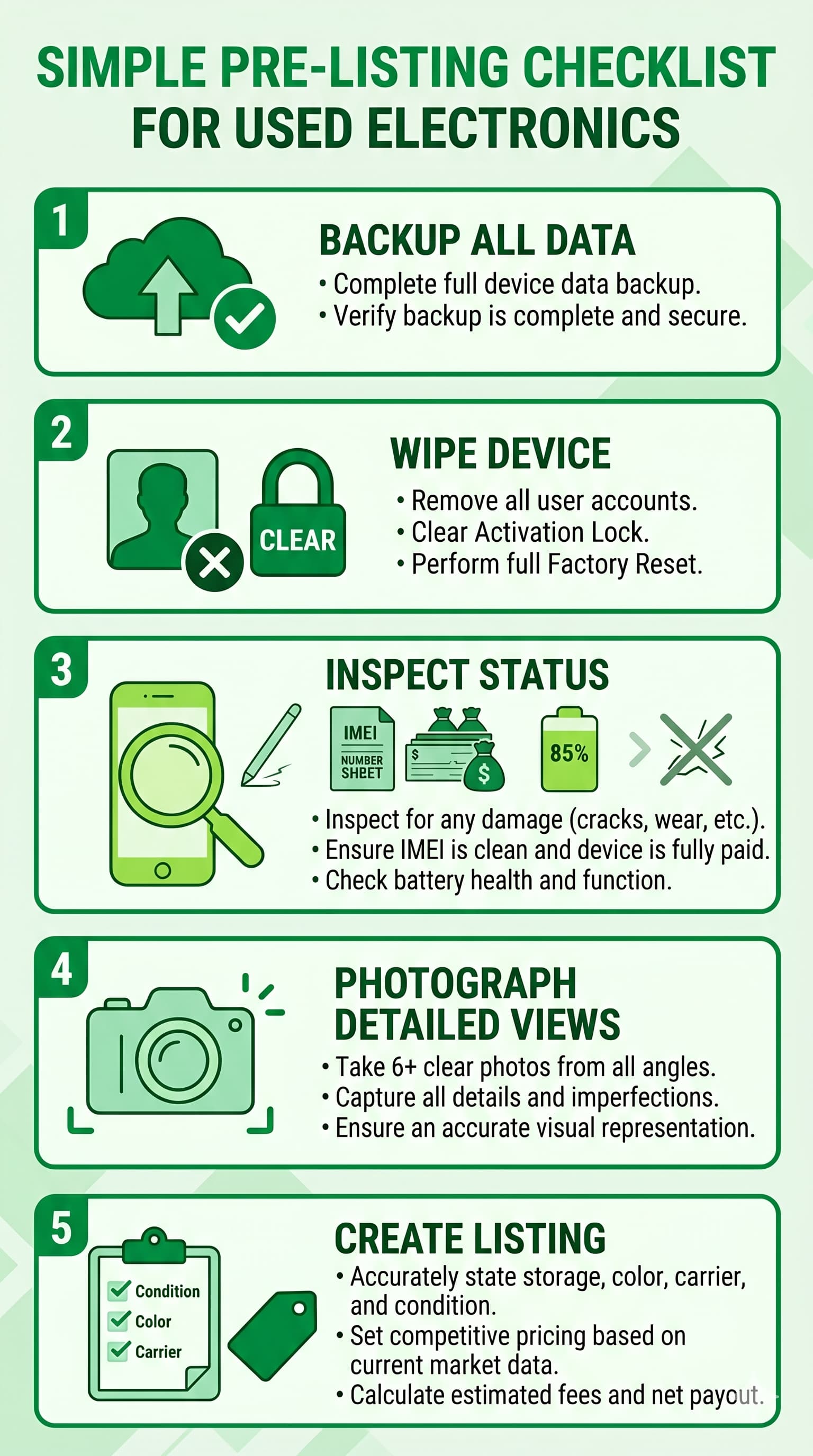
Pre-Listing Checklist
Run through this before you submit.
- Device fully backed up and backup confirmed
- iCloud, Google account, or Microsoft account removed
- Activation Lock or FRP cleared
- Factory reset completed
- IMEI/ESN clean, device fully paid off
- No cracked glass, no water damage
- Battery functional; iPhone battery health disclosed if below 80% with service message
- At least 6 clear photos taken
- Storage, color, carrier, and condition accurately stated
- Price checked against recent Swappa completed sales
- Fees calculated so net payout is acceptable
Step 4: Ship Your Device
Once your listing sells, you are responsible for getting the device to the buyer without damage.
Pack it right. Use the original box if you have it. If not, use a rigid cardboard box with at least two inches of cushioning on all sides (bubble wrap, foam, or packing peanuts). Do not use padded envelopes for anything with a screen.
Use a tracked, insured service. USPS Priority Mail, UPS Ground, and FedEx Ground all include tracking and offer optional insurance. Insurance is worth buying for any device over $100. Keep your receipt and tracking number.
Photograph the packaged device before sealing the box. If a shipping damage dispute comes up later, that documentation is your best evidence.
Ship within the required timeframe of 2 business days. Fast shipping improves your seller standing and keeps buyers from opening disputes.
The packing and shipping guide covers materials, carrier options, and how to file an insurance claim if needed.
Read Swappa’s standard shipping policy to learn about requirments.
Step 5: Get Paid
Swappa processes payments through PayPal (available to all sellers) and Stripe (available to select sellers). Both offer seller protection and dispute resolution.
Payment is held until the buyer confirms receipt or a confirmation window closes. Once released, funds go to your PayPal or Stripe account for transfer to your bank.
If something goes wrong: Swappa has 24/7/365 human support with an average response time around 20 minutes. If a buyer claims the device is not as described, Swappa mediates. Sellers are required to accept not-as-described returns. Buyer’s-remorse returns are at the seller’s discretion. When a PayPal refund is properly processed, the 3% seller fee is returned.
The payout and payment guide covers timelines, transfer options, and dispute steps.
FAQ
How long does it take to sell a used phone or laptop on Swappa?
It depends on the device, price, and demand. Popular models priced at market rate often sell within a few days. Older or niche devices may take longer. Pricing competitively against current completed-sale data is the single biggest factor in time-to-sale.
Do I need the original box or accessories to list on Swappa?
No. Original packaging and accessories can increase sale price and buyer confidence, but neither is required to list. If you do include them, state it clearly in your description.
What if my device has a cracked screen or water damage?
Swappa does not accept devices with cracked glass or water damage. If your device is in that condition, consider browsing Swappa for a replacement instead.
How does Swappa protect sellers from fraud?
Swappa uses AI fraud prevention on listings and transactions, staff review every listing before it goes live, and payments run through PayPal or Stripe, which both provide seller protection for eligible transactions.
What fees does Swappa charge sellers?
Swappa charges a flat 3% seller fee plus payment processing (PayPal 3.49% plus $0.49, or Stripe 2.9% plus $0.30 for eligible sellers). Listing is free. Full details at Swappa’s fee page.
Can I list a device I am still paying off?
No. Swappa requires devices to be fully paid off with a clean IMEI/ESN. A device still on a carrier financing plan may have its IMEI flagged as lost or stolen if the agreement defaults, which creates a serious problem for the buyer.
Ready to List?
The selling workflow for used electronics is the same every time: wipe and prep, price against real completed-sale data, build an honest listing with solid photos, ship with tracking and insurance, and collect payment through a protected channel. Each step feeds the next, and all five are doable in a single afternoon.
Swappa is built for exactly this. Free to list, staff-reviewed for quality, and backed by human support if anything needs sorting out.
Take action and sell your used electronics on Swappa. Start with our Complete How to Sell Electronics guide.

