
Shipping a device you just sold should be the easy part. But a bad pack job or the wrong carrier can turn a clean sale into a dispute, a damaged phone, or an unnecessary $20 in fees. This guide covers the four things every electronics seller needs to know: how to pack safely, which carrier is cheapest, whether to buy insurance, and device-specific tips for phones and consoles.
Quick Answer
Use double-box packing with at least 2 inches of cushioning on all sides. For most electronics under 2 lbs, USPS Priority Mail or a discounted label service (like Pirate Ship) beats the counter price at UPS or FedEx. Buy insurance for any device worth more than $200. Start your listing and get the sale before worrying about the label.
What Makes Shipping Electronics Different
Electronics are fragile, high-value, and contain lithium batteries. That combination means shipping them is not the same as mailing a book or a pair of shoes. A cracked screen or a dead battery on arrival will trigger a return request, and most payment processors side with buyers in those disputes.
The good news: the basics are not complicated. Pack it well, choose the right carrier for the weight, and insure anything valuable. The sections below break each of those down and point to deeper guides where the details matter.
Step 1: Pack It Safely
Packing is where most shipping damage happens. Carriers drop, stack, and jostle packages. A device that shifts inside its box, or that is packed in a single thin box, is at risk.
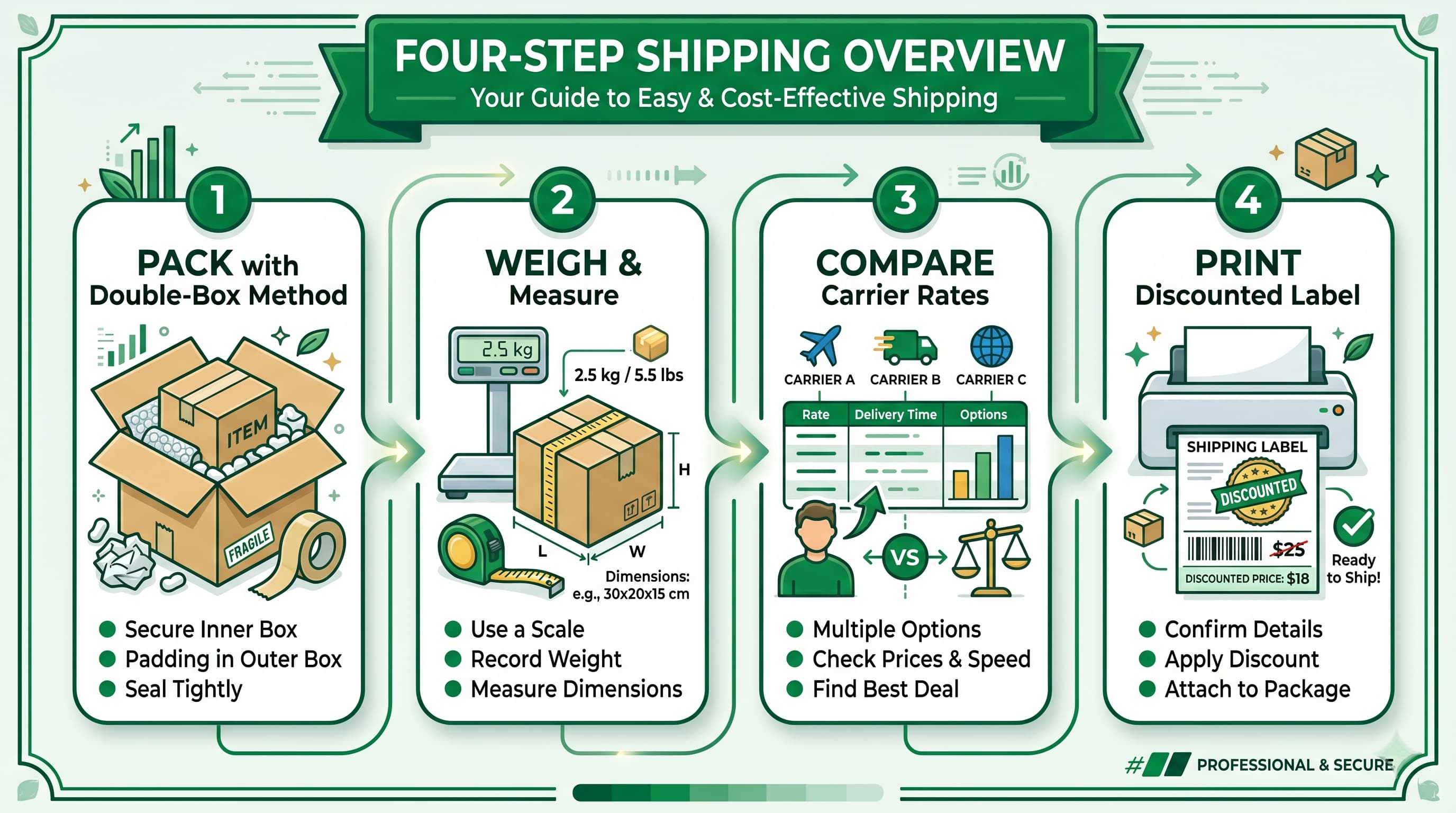
The short version: wrap the device in bubble wrap or foam, place it in an inner box, then place that inner box inside a larger outer box with at least 2 inches of cushioning material (packing peanuts, foam, or crumpled kraft paper) filling the gap. This is called double-boxing, and it is the standard method for fragile electronics.
For materials, anti-static bags matter if you are shipping bare circuit boards or accessories. For phones, laptops, and consoles, standard bubble wrap does the job. Seal every seam with packing tape, not masking tape or scotch tape.
For a complete walkthrough of materials, the packing method, and device-specific notes, see the full packing guide.
Step 2: Choose the Cheapest Carrier
Carrier rates depend on package weight, dimensions, and how far it is traveling. For most consumer electronics, you have three real options: USPS, UPS, and FedEx. None of them is always cheapest. It depends on the package.
As a rough guide: USPS Priority Mail tends to win on small, lighter packages (under 2 lbs). UPS and FedEx Ground can be cheaper on heavier items like gaming consoles or laptops when you use discounted label services. Buying labels at the counter adds a significant markup over what you would pay through a third-party platform.
Discounted label services (Pirate Ship is the most widely used) let individual sellers access commercial rates without a business account. On a typical phone shipment, the savings over a counter-rate label can run $3–8.
The full carrier comparison breaks down rates by device weight category, explains dimensional weight pricing, and shows how tracking and delivery confirmation work across carriers.
Step 3: Decide on Insurance
Carrier insurance (called declared value coverage at UPS and FedEx, or add-on insurance at USPS) pays out if a package is lost or damaged in transit. It is not free, so the decision is whether the risk justifies the premium.
For low-value items (under $100), the cost of insurance often exceeds what you would recover. For devices in the $200–$500 range, it is worth running the numbers. For high-value items like a flagship phone or a current-gen gaming console, insurance is almost always worth it.
A note on carrier vs. third-party insurance: carrier coverage can be harder to collect on because they require proof of damage and can dispute claims. Third-party services (like Shipsurance) tend to have cleaner claims processes for electronics.
The full insurance guide covers coverage limits, how to file a claim, and when each option makes sense.
Step 4: Device-Specific Shipping Guides
Packing and carrier rules apply across all electronics, but some devices have requirements you need to know before you ship.
Shipping a Phone
Phones are small but contain lithium-ion batteries, which are regulated by IATA (the international aviation authority) and domestic carrier rules. Most domestic shipments are fine as long as the battery is installed in the device and the phone is powered off. Air shipments have additional rules.
Phones also tend to be light, which means USPS Priority Mail Flat Rate or a small box label is often the cheapest option. The phone-specific guide covers box sizing, battery rules, and how to choose the right label.
Shipping a Gaming Console
Consoles are heavier and bulkier than phones, which changes both the packing approach and the carrier math. If you have the original box, use it. If not, you will need a purpose-built double-box setup with significant cushioning for corners and screens.
Console shipments often cross the threshold where UPS or FedEx Ground with a discounted label becomes cheaper than USPS. They are also high-value enough that insurance is rarely a question.
Follow our guide on how to ship a gaming console.
Shipping on Swappa: How It Works
When you list on Swappa, your listing goes through a staff review before it goes live. Once your device sells, you pack it, buy a label, and ship directly to the buyer. Swappa uses PayPal for buyer and seller protection, and select sellers can use Stripe. The buyer has recourse if the device does not match the listing, so accurate condition descriptions and solid packing protect both sides.
Swappa’s fees are straightforward: a flat 3% per party. Listing is free.
FAQ
What is the safest way to ship electronics?
Double-box packing is the safest method for most electronics. Wrap the device, place it in an inner box, then pack that box inside a larger outer box with at least 2 inches of cushioning on all sides. This protects against drops and compression during transit.
What is the cheapest way to ship electronics?
It depends on weight and distance. For devices under 2 lbs, USPS Priority Mail through a discounted label service (like Pirate Ship) is often cheapest. For heavier items like consoles or laptops, UPS or FedEx Ground with commercial-rate labels may be cheaper. See the full carrier comparison for a breakdown by device weight.
Do I need shipping insurance for electronics?
For devices worth more than $200, insurance is generally worth the cost. For lower-value items, the premium may exceed what you would recover. High-value devices like current-gen consoles or flagship phones should almost always be insured.
Can I ship a phone through USPS?
Yes. Phones with lithium-ion batteries installed can be shipped domestically via USPS, UPS, and FedEx without special permits, as long as the battery is inside the device. Batteries shipped separately have stricter rules.
What happens if my electronics are damaged during shipping?
File a claim with the carrier immediately. If you insured the package, you can recover the declared value. On Swappa, buyers are entitled to a refund if the device does not arrive as advertised, so accurate photos and packing records help resolve disputes.
How do I print a shipping label for selling on Swappa?
Swappa does not generate labels directly. Most sellers use USPS Click-N-Ship, UPS, FedEx, or a third-party service like Pirate Ship for discounted rates. Pirate Ship is free to use and typically offers the best rates for individual sellers shipping consumer electronics.
Ship Smarter, Sell Faster
Shipping electronics is a skill that gets easier with repetition. Pack with care, pick the right carrier for the weight, insure what is worth insuring, and follow any device-specific rules. Do that, and the shipping step of your sale will not be a problem.
Ready to list? Swappa’s verified listings and flat-fee structure make it one of the more straightforward ways to sell used electronics. Pack it up and ship it out.

