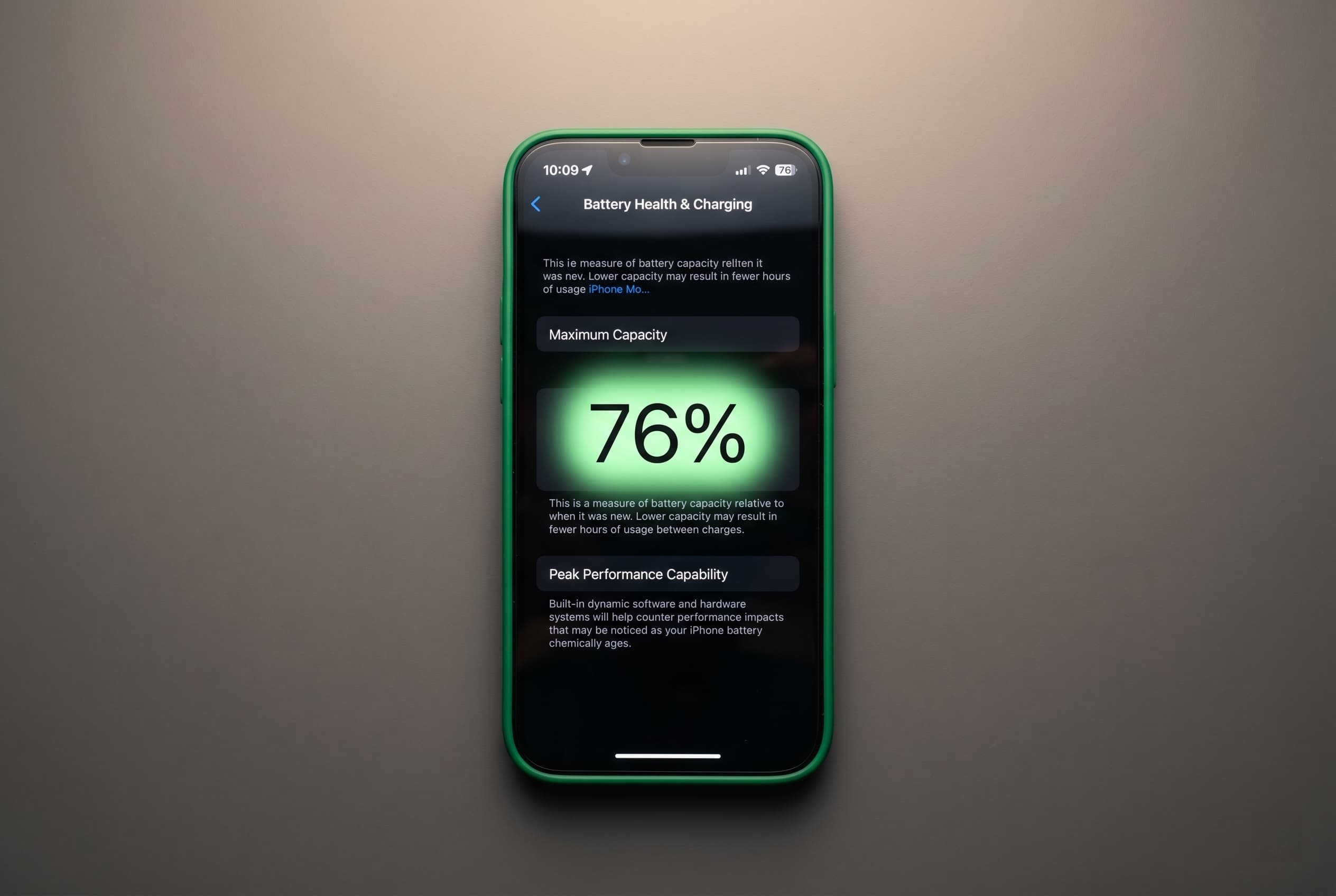
Your iPhone still works fine. The screen looks good, it holds calls, the camera is sharp. But Settings shows battery health at 77%, and now you are not sure whether to replace the battery before listing it, disclose and discount, or just ignore it. This guide gives you the math and a clear decision rule for each iPhone model.
Quick Answer
If replacing the battery costs less than the price drop you will take on Swappa, replace it. For most iPhone 13 and newer models, a fresh battery pays for itself and then some. For iPhone 12 and older, the math usually favors disclosure plus a lower asking price. Shop verified iPhones on Swappa to see what models are selling for right now.
What “Below 80%” Actually Means for Your iPhone
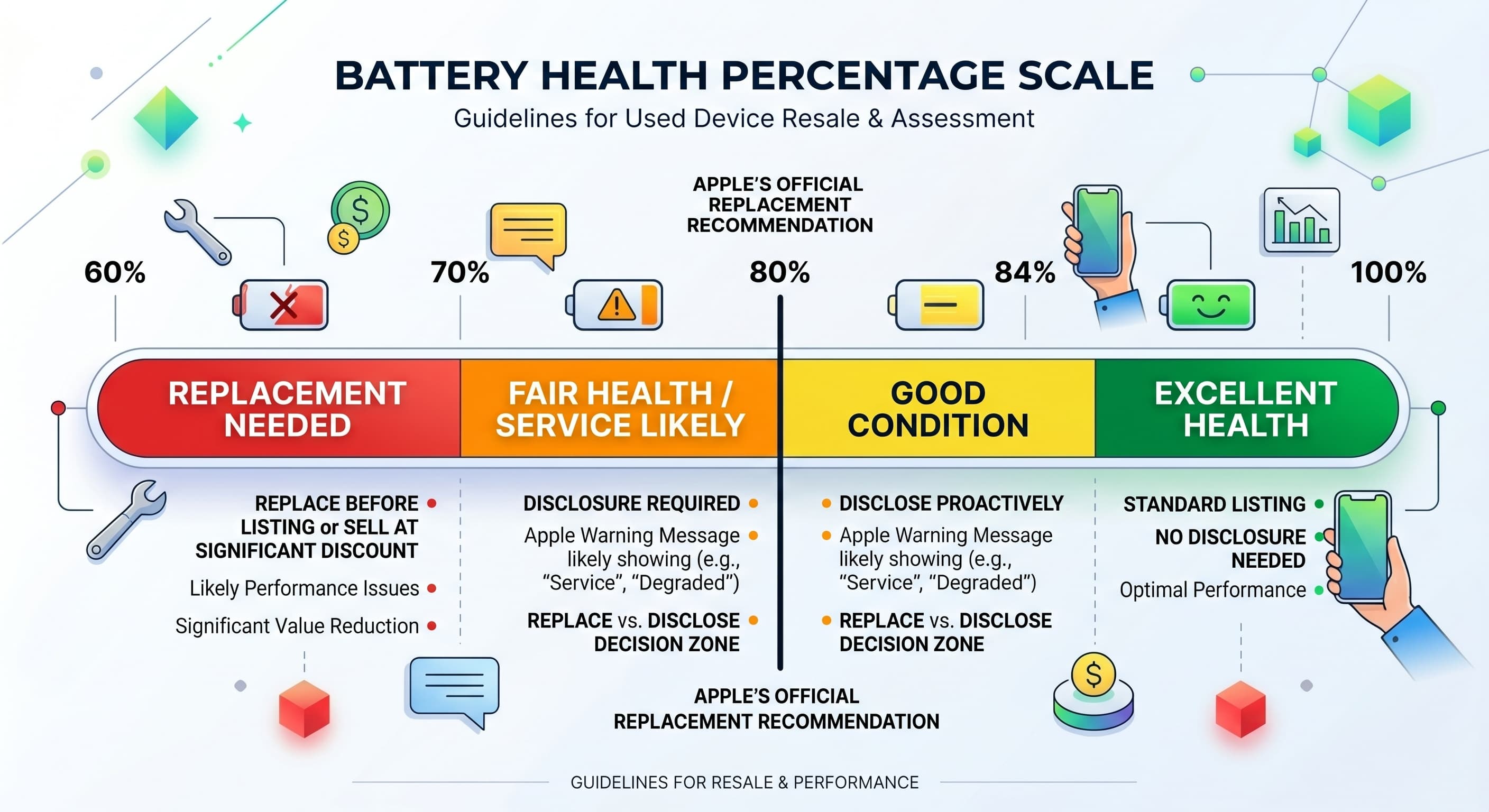
Battery health is measured as maximum capacity relative to when the battery was new. Apple flags 80% as the service threshold. Below that, iOS may show a message in Settings under Battery Health and Charging recommending replacement.
That message matters for two reasons. First, your iPhone may start throttling performance to prevent unexpected shutdowns. Second, and more relevant if you are selling, Swappa requires you to disclose sub-80% battery health if Apple’s service recommendation is showing. This is not optional. Listing an iPhone without disclosing a flagged battery violates Swappa’s listing standards and can result in a return.
For buyers: if a listing does not mention battery health at all, check the photos carefully and ask the seller to confirm the percentage before you buy.
How to Check Your iPhone’s Battery Health
- Open Settings
- Tap Battery
- Tap Battery Health and Charging
- Look at Maximum Capacity
If you see a message below the percentage that reads “Your battery’s health is significantly degraded” or recommends service, that is the Apple flag. A phone with 79% capacity and no message is different from a phone with 79% and the service flag. The latter requires Swappa disclosure.
What a Sub-80% Battery Costs You on the Used Market
A degraded battery is not a deal-breaker, but buyers know it means near-term cost. On Swappa and across the broader used iPhone market, listings with sub-80% battery health typically see price reductions of $50 to $100 compared to equivalent condition phones with healthy batteries. On higher-value flagship models, the gap can stretch to $125.
Buyers looking at a used iPhone 15 Pro with 76% battery are already doing mental math: “This costs $99 to fix at Apple.” They will either pass on your listing or open with a lower offer. Transparent disclosure with an honest price is more effective than leaving it vague.
Swappa guide on understanding Apple battery health and how it affects used iPhone pricing
Apple Battery Replacement Costs by Model (2026)
Apple charges a flat out-of-warranty fee by model generation. Third-party authorized shops run cheaper and are often just as fast.
| iPhone Model | Apple Store | Third-Party Shop | Repair Time |
|---|---|---|---|
| iPhone 8, SE (2nd gen) | $89 | $40 to $55 | 45-60 min |
| iPhone X, XS, XR, 11 series | $89 | $49 to $60 | 45-60 min |
| iPhone 12 series | $89 | $59 to $69 | 45-60 min |
| iPhone 13 series | $89 | $65 to $75 | 45-60 min |
| iPhone 14 series | $89 | $75 to $85 | 1.5-2 hrs |
| iPhone 15 series | $99 | $79 to $89 | 1.5-2 hrs |
| iPhone 16 series | $99 | $89 to $99 | 1.5-2 hrs |
If you have active AppleCare+, battery replacement under 80% is covered at no charge. Use it before you list.
Third-party shops that are Apple Authorized Service Providers use genuine Apple parts and the repair shows as certified in Settings. Non-authorized shops may use aftermarket batteries, which can show as “Unknown Part” in the battery menu. That will come up in a buyer’s inspection, so it is worth asking the shop what parts they use before you commit.
The Decision Tree: Replace or Disclose?
This is the core question. Here is how to run the math.
Step 1: Find your iPhone’s current Swappa price range in good or very good condition with a healthy battery. Check live iPhone listings on Swappa.
Step 2: Estimate what your phone will realistically sell for with a disclosed sub-80% battery. Subtract $75 to $100 from the healthy-battery price as a starting estimate.
Step 3: Compare that discount to the battery replacement cost from the table above.
If the discount is bigger than the repair cost, replace the battery. If the repair cost is bigger than the discount, disclose and price accordingly.
Model-by-Model Breakdown
iPhone 15 and 15 Pro
These are selling in the $350 to $575 range on Swappa depending on storage and condition. A sub-80% battery likely costs you $75 to $125 in sale price. Apple charges $99 to replace. Net outcome: replace the battery. You come out ahead by $25 to $75 and your listing sells faster.
iPhone 14 and 14 Pro
Swappa prices run $250 to $450 in good condition. A degraded battery costs you $50 to $100. Apple charges $89. Third-party: $75 to $85. Replace it if you can get the third-party rate. At Apple’s $89, it is close to break-even, but a certified fresh battery means your listing moves faster and at full price.
iPhone 13 and 13 Pro
Good-condition 13s run $175 to $320 on Swappa. Battery discount: $50 to $80. Apple replacement: $89. Third-party: $65 to $75. Replace at a third-party shop. At $65 versus an $80 price discount, you net $15 ahead and avoid the stigma of a flagged battery on your listing.
iPhone 12 series
These are running $120 to $200 in good condition. The battery discount is $40 to $60. Apple replacement is $89. Third-party: $59 to $69. At best you break even on the repair cost. Disclose the battery percentage, price the phone honestly, and save yourself the repair hassle.
iPhone 11 and older
Disclose and price accordingly. These models are selling below $150 on Swappa. The repair math does not work in your favor, and buyers shopping at this price point expect some wear.
How to Disclose Battery Health the Right Way on Swappa
If you decide to list without replacing, disclosure is the move. Here is what to include in your listing:
- State the exact battery health percentage (“Battery health: 77%”)
- Note whether the Apple service message is showing
- Price below comparable listings with healthy batteries
- Add photos of the Battery Health screen in Settings
Buyers on Swappa appreciate honesty and will pay a fair price for a phone with a disclosed battery. What kills trust (and invites returns) is a listing that leaves it out.
For Buyers: What to Know Before You Buy a Sub-80% iPhone
A disclosed low-battery iPhone can still be a smart buy. Here is how to evaluate it:
- Price the repair in immediately. If the phone is listed at $50 below a comparable healthy-battery listing, but the battery replacement costs $89, you are paying more, not less. Ask for a price that leaves room to cover the repair.
- Confirm the Apple message status. A phone at 78% without the service flag is less urgent than one at 78% with a “battery’s health is significantly degraded” warning.
- Ask about throttling. On older iPhones, a degraded battery can cause performance management (throttling) to kick in. Check Settings under Battery Health and Charging for any “Performance Management” note.
- Check IMEI and ESN. Battery health is one factor. Make sure the phone is not carrier-locked or blacklisted. Swappa does this part for you as a buyer. Sellers can run a free IMEI check on Swappa before creating a listing.
FAQ: iPhone Battery Health and Used Resale
Does replacing the battery increase resale value?
Yes, for most iPhone 13 and newer models. A fresh Apple-certified battery removes the service flag from Settings, increases buyer confidence, and allows you to list at full market price. The math generally favors replacement for phones selling above $250.
Can I sell an iPhone with battery health below 80% on Swappa?
Yes. Swappa allows it, but you must disclose the battery health percentage and the Apple service message if it is showing. Listings that omit this information are subject to return.
What is the difference between Apple Store replacement and a third-party shop?
Apple uses certified genuine parts and the repair is logged to your device. An Apple Authorized Service Provider uses the same parts at a similar price. A non-authorized shop may use aftermarket batteries, which can show as “Unknown Part” in Settings. For a phone you are selling, a certified repair is worth the small premium.
How do buyers check battery health when buying used?
On the phone itself: Settings, Battery, Battery Health and Charging. Reputable sellers include a screenshot in their listing photos. If a listing does not show the battery health screen, ask before buying.
Does AppleCare+ cover battery replacement below 80%?
Yes. If your battery maximum capacity is below 80% and you have active AppleCare+ coverage, Apple will replace the battery at no charge. This is one of the clearest cases where using your coverage before listing on Swappa makes financial sense.
What happens to resale value if I use an aftermarket battery?
It depends on the buyer. Some will not care as long as the phone works well. Others will specifically ask for OEM parts. If you want to maximize sale price and buyer confidence, use a certified shop and note it in your listing.
Bottom Line
Battery health is a number that buyers translate directly into dollars. For iPhone 13 and newer, replacing a sub-80% battery at a third-party authorized shop usually costs less than the price you will give up by disclosing it. For iPhone 12 and older, disclosure plus honest pricing is the cleaner play.
Either way, do not hide it. A transparent listing on Swappa sells faster and with fewer headaches than one that surprises a buyer after the fact.
List your iPhone on Swappa and reach real buyers, or shop verified iPhones with disclosed battery health if you are on the buying side.