Updated – June 29, 2026
Part of the promise of Swappa is that buyers receive a fully functioning device, and that includes the battery. Every battery has to properly charge and discharge. This guide explains how to check Apple Battery Health on an iPhone, iPad, and MacBook, what the numbers actually mean, and how battery health factors into buying and selling on Swappa.
Quick Answer
Apple Battery Health shows how much of a battery’s original capacity remains, listed as Maximum Capacity. On iPhone, check it under Settings, Battery, Battery Health & Charging. On newer iPads, check Settings, Battery, Battery Health. On a MacBook, open System Settings, Battery, then Battery Health. Apple generally flags a battery for service once capacity falls below 80%. Want a device with strong battery life already vetted by a human review team?
Shop used Apple devices on Swappa.
Apple Battery Health: Overview
Apple’s Battery Health feature reports the maximum capacity of a rechargeable battery relative to when it was new, plus, on iPhone, its peak performance capability. Battery capacity starts at 100% and declines with normal use over time.
Apple has said that a “normal battery is designed to retain up to 80% of its original capacity at 500 complete charge cycles when operating under normal conditions” for iPhone. MacBooks with Apple silicon are rated higher, up to 1,000 cycles before capacity typically drops to around 80%. Once a battery falls below that 80% mark, Apple considers it meaningfully degraded and recommends a replacement.
The takeaway is the same across devices: a higher Maximum Capacity percentage and a lower cycle count generally mean more usable battery life left in the device.
How to Check iPhone Battery Health
Apple Battery Health is available on the iPhone 6 and later running iOS 11.3 or later. To check it:
- Open Settings.
- Tap Battery.
- Tap Battery Health & Charging.
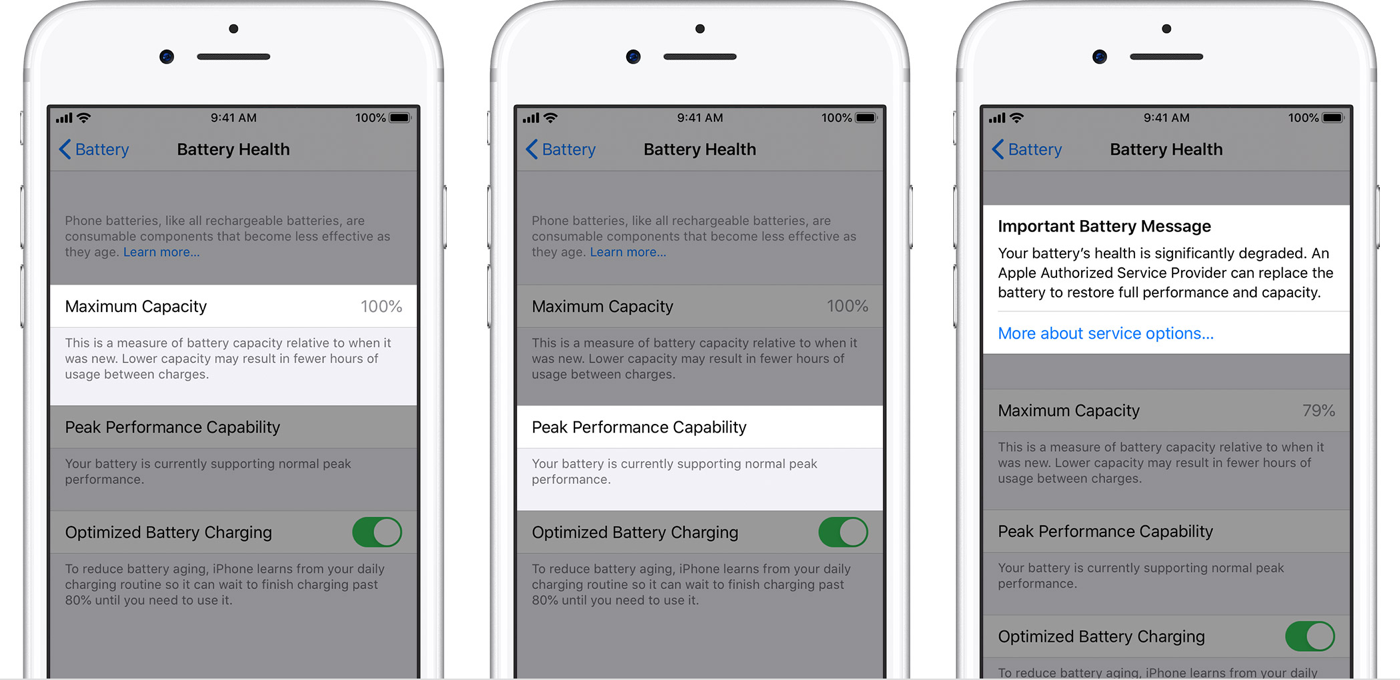
There you will see Maximum Capacity as a percentage and a Peak Performance Capability message that describes how the battery is performing. We break down each of those messages further down in this guide.
How to Check iPad Battery Health
Apple added a dedicated Battery Health screen to iPad more recently, so where you look depends on the model.
Newer iPads (such as iPad Pro with M4, iPad Air with M2 or M3, iPad mini with A17 Pro, and iPad with A16) running iPadOS 17.4 or later show it directly:
- Open Settings.
- Tap Battery.
- Tap Battery Health.
On these models you will see Maximum Capacity and Cycle Count, and often the manufacture date and first-use date.
Older iPads do not include a built-in Battery Health screen. You can still get a sense of battery condition by going to Settings, Privacy & Security, Analytics & Improvements, Analytics Data and looking for battery-related logs, or by connecting the iPad to a computer and using a trusted third-party tool such as coconutBattery or iMazing.
If you are shopping for a tablet, our Used iPad Buyer’s Guide covers which generations hold up best on the secondary market, including how long each model keeps getting software updates.
How to Check MacBook Battery Health
MacBooks running macOS Ventura or later show battery health in System Settings:
- Click the Apple menu, then System Settings.
- Click Battery in the sidebar.
- Look at Battery Health. You will see a condition of either Normal or Service Recommended.
- Click the info (i) button next to Battery Health to view Maximum Capacity and Cycle Count.
If you are on an older version of macOS, or you want the cycle count quickly, use System Information instead:
- Hold the Option key and click the Apple menu.
- Click System Information.
- Select Power in the sidebar.
- Read the Cycle Count and Condition under Battery Information.
A condition of Normal means the battery is functioning as expected. Service Recommended means capacity has dropped enough that Apple suggests a replacement. For help deciding whether a used Mac is worth it once memory prices climbed, see our Used MacBook Buyer’s Guide.
Where to Check Apple Battery Health by Device
| Device | Where to check | What you see | Apple’s service threshold |
|---|---|---|---|
| iPhone (6 and later, iOS 11.3+) | Settings, Battery, Battery Health & Charging | Maximum Capacity, Peak Performance Capability | Below 80% |
| iPad (newer models, iPadOS 17.4+) | Settings, Battery, Battery Health | Maximum Capacity, Cycle Count | Below 80% |
| iPad (older models) | Analytics Data or a third-party tool | Battery condition (indirect) | Below 80% |
| MacBook (macOS Ventura+) | System Settings, Battery, Battery Health | Condition, Maximum Capacity, Cycle Count | Service Recommended |
Apple Battery Health: What It Means on Swappa
Swappa requires all devices to be fully functional, so battery health is something every Swappa user should understand, buyers and sellers alike. Fully functional, as it relates to the battery, means the battery properly charges and discharges. That applies to every device listed on Swappa, from an iPhone to an iPad to a MacBook.
There is no minimum battery percentage required to list a device on Swappa. The battery just has to work. Things get slightly more specific for iPhones: if a seller is listing an iPhone with battery health below 80%, or with an Apple battery message showing in settings, that must be disclosed on the listing.
If you are a buyer and you want a device at or above a specific Maximum Capacity, review the listing for that detail or message the seller before you buy. Sellers on Swappa often note battery health right in the listing, especially for iPhones.
Read more in the Swappa FAQ and the Apple Battery Health requirements answer.
Apple Battery Health Explained: Capacity and Capability
Speaking generally, a battery’s Maximum Capacity begins at 100% and is considered functional until it drops below 80%. Apple defines Maximum Capacity as “a measure of battery capacity relative to when it was new. Lower capacity may result in fewer hours of usage between charges.”
On iPhone, Apple also reports Peak Performance Capability, which can show one of several messages:
- Performance Is Normal: the battery supports normal peak performance.
- Performance Management Applied: the iPhone had an unexpected shutdown because the battery could not deliver the needed peak performance, so management was applied.
- Battery Health Unknown: the iPhone cannot determine the battery health.
- Performance Management Turned Off: appears when you manually disabled the performance management protections.
- Battery Health Degraded: shown when Maximum Capacity drops below 80%, the point at which Apple recommends replacing the battery.
- Important Battery Message: shown when Apple cannot verify a genuine Apple battery. Found on the iPhone XS, XS Max, XR, and later.
On iPad and MacBook, Apple leans on Cycle Count and a condition status rather than the same peak performance messages, but the underlying idea is identical: lower capacity and higher cycle counts mean a battery closer to the end of its useful life.
Read more in Apple’s own iPhone Battery and Performance documentation.
Top Reasons to Buy Your Next Apple Device on Swappa
- Swappa requires all items to be fully functional, so you are not stuck with something broken, cracked, or water damaged.
- Every listing is reviewed by a human team, and battery condition is part of that standard.
- Swappa is people-powered, so you buy directly from other users and skip the middleman markup.
- Swappa has fair fees that are lower than typical auction-site fees, split between buyer and seller.
- Swappa uses PayPal for its strong buyer and seller protections.
Used Apple devices typically run well below new retail, often 30 to 60% off depending on the model and condition, and that gap is a big reason shoppers choose the secondary market. Prices move with supply and demand, so check current sold prices on Swappa before you buy.
Another factor worth weighing is Swappa’s support and moderation team, available 24/7/365 with responses typically within minutes. You do not have to take our word for it. Read the reviews left by real Swappa buyers and sellers on Trustpilot.
Frequently Asked Questions
What is a good battery health percentage on a used Apple device?
Apple considers a battery healthy until Maximum Capacity falls below 80%. Many buyers look for 85% or higher on an iPhone for comfortable all-day use, but the right number depends on your budget and how heavily you use the device. A lower percentage is not a dealbreaker if the price reflects it.
Does Swappa require a minimum battery health to list a device?
No. Swappa has no minimum battery percentage. The battery only needs to properly charge and discharge. For iPhones, a seller must disclose if battery health is below 80% or if an Apple battery message is showing.
How do I check battery health on a MacBook?
Open System Settings, click Battery, then look at Battery Health for a condition of Normal or Service Recommended. Click the info button to see Maximum Capacity and Cycle Count. On older macOS, hold Option and click the Apple menu, then open System Information and select Power.
Why does my older iPad not show a Battery Health screen?
Apple only added a dedicated Battery Health menu to newer iPad models running iPadOS 17.4 or later. On older iPads, check battery condition through Analytics Data in Settings, or use a trusted third-party tool like coconutBattery or iMazing on a connected computer.
What is cycle count and why does it matter?
A cycle is one full charge and discharge of the battery. iPhones are rated for about 500 cycles before capacity drops to 80%, while Apple silicon MacBooks are rated up to 1,000 cycles. A lower cycle count generally means more battery life remaining.
Can I replace the battery instead of buying a new device?
Often, yes. A battery replacement is usually far cheaper than a new device and can extend the life of an iPhone, iPad, or MacBook by years. If the battery is the main issue, a replacement is worth pricing out before you upgrade.
The Bottom Line
Apple Battery Health is one of the most useful signals you have when buying or selling used tech. On iPhone you get Maximum Capacity plus a performance message, on newer iPads you get capacity and cycle count, and on MacBooks you get a condition status alongside the same metrics. Across all three, below 80% capacity is Apple’s line for replacement. Knowing where to look and what the numbers mean keeps both sides of a sale honest, which is exactly what Swappa is built for.