Swappa uses PayPal for Marketplaces because it simplifies the selling process. It also helps to prevent fraud. PayPal for Marketplaces is required for all sellers on Swappa, but don’t worry because the setup process is quick and easy.
Initial PayPal for Marketplaces setup
Setting up PayPal for Marketplaces is a one-time process. You can configure and authenticate your Swappa account for PayPal for Marketplaces from within your Swappa profile with the following steps.
- Navigate to your Swappa “My Profile” page
- Click the blue “Connect to PayPal for Marketplaces” button
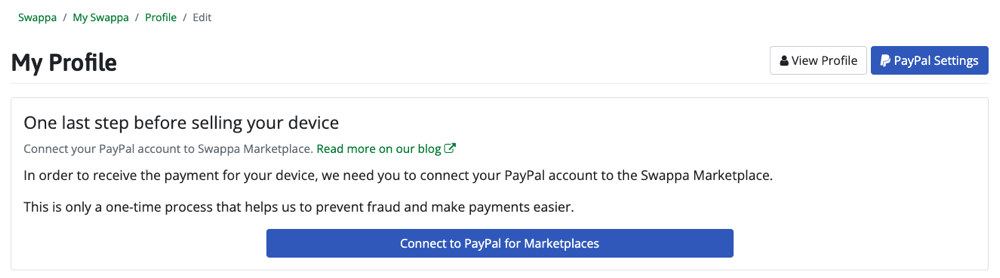
From this point will be directed over to the PayPal website, beginning with a page asking you to “Connect a PayPal account to start accepting payments on Swappa.” The specific steps from this point vary slightly based on whether you are connecting to an existing PayPal account, or creating a new PayPal account — but regardless of the option you choose — you just need to follow the prompts from PayPal. Also, be sure to look for an email from PayPal at the end because the final step in the process is confirming the link between the two accounts.
If you need to update your PayPal account (link a different account), you will need to click the green “Link a different PayPal account” button on the PayPal Settings page in your Swappa profile.
Verify your PayPal for Marketplaces setup
Veryfing your existing PayPal for Marketplaces setup isn’t something you should have to do often, if ever. But, if you think there may be an issue, you can check the status in the PayPal Settings page within your Swappa profile.
- Navigate to the PayPal Settings page on Swappa
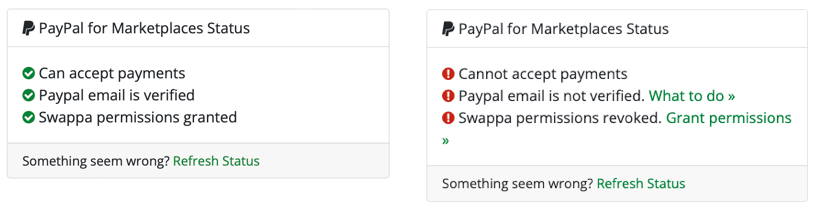
Once on this page, you’ll need to look for the “PayPal for Marketplaces Status” box (shown in the above screenshots), which will show three sections, and the wording will vary slightly depending on the current status. Assuming all is well, you will see three green checkmarks with; Can accept payments, PayPal email is verified, and Swappa permissions granted. If there is an issue with any of the options, you will see a red checkmark to indicate the issue.
If you have any questions about any of the info mentioned here, feel free to reach out to our support team via our help desk.