Cell phone resale can be labor-intensive. Many businesses rely on spreadsheets for inventory management, and this can lead to a variety of errors, including incorrect quantities relative to available inventory. Additionally, there are other logistical aspects to consider, such as finding a safe place to buy used tech in bulk, testing device functionality, and figuring out where to sell for the most money.
Swappa has partnered with WholeCell, a serialized inventory management system built from the ground up for mobile devices. Whether you’re selling in bulk or selling directly on Swappa’s end-user marketplace, WholeCell’s bidirectional integration with Swappa streamlines your workflow and saves you time. Keep reading to learn more about WholeCell.
What is WholeCell?
WholeCell is an end-to-end inventory management solution for cell phone wholesalers. Unlike many of its competitors, WholeCell was built from the ground up for mobile devices. This makes WholeCell a more efficient way for volume sellers to track every aspect of cell phone resale — from maintaining a serialized inventory history and tracking financials to processing shipments and returns, and everything in between.
Meet WholeCell, the inventory system for device wholesalers:
Serialized Inventory Tracking and Management
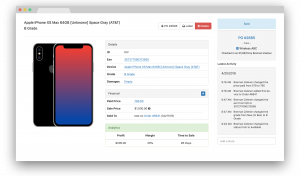
WholeCell offers a robust collection of tools to help you optimize your workflow. This begins with organization. Unlike spreadsheets and other inventory management systems, WholeCell helps you track your products with a fully serialized inventory management system. Each device is uniquely identified, allowing you to generate inventory reports and annotate specific device characteristics for each phone in your warehouse.
WholeCell’s powerful Bulk Edit tool allows you to modify multiple devices at a time, all while maintaining a detailed edit history, so you know exactly who did what and when. WholeCell can even generate barcoded labels and track RMAs individually based on IMEI, helping you make sure that all returned devices were actually purchased from you.
Seamless integration with Swappa
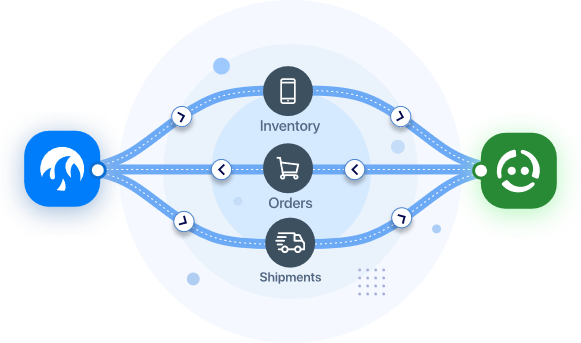
Whether you’re selling tens or hundreds of items, tight integration with WholeCell eases the logistical burden of running a cell phone resale business. Everything is synced between the two platforms, from inventory to orders and shipments, so you can get your listings live on the Swappa Marketplace in just a few clicks.
Export directly to Swappa from the Bulk Actions menu within WholeCell. Once your listing sells, Swappa data is automatically sent back to WholeCell, saving you the hassle of manually creating e-commerce orders in your inventory management system.
Advanced Analytics
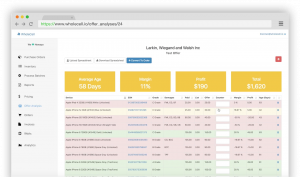
WholeCell features advanced business analytics to effortlessly compile the data you need as soon as you need it. This includes standard metrics such as monthly gross profit to more advanced analyses such as margin per customer or supplier, and even how much value you have tied into each individual phone model. These tools boost business intelligence by helping you quickly and easily identify your best customers, purchasing channels, and sales avenues.
WholeCell even includes an advanced Offer Analysis tool. This allows you to upload a customer spreadsheet and quickly view color-coded financial information such as margin, profit, age, and value at a glance.
How to use Swappa’s WholeCell integration
Export your WholeCell inventory to Swappa in just a few clicks
Selling on Swappa’s end-user marketplace gets you the most money for your used tech. In order to keep Swappa safe for buyers and sellers, listings are reviewed by our expert moderation team before they are approved.
Swappa launched Incoming Inventory in order to streamline the listing creation process for Power Sellers. Incoming Inventory is a staging area where volume sellers can start listings in a non-linear fashion and perform bulk edits on devices with similar characteristics. This makes listing on Swappa even easier, allowing you to find the perfect workflow and ultimately benefit your bottom line.
Read more: How to use Swappa’s Incoming Inventory
There are several ways to add items to Incoming Inventory including individually, using a spreadsheet, or adding IMEI numbers in bulk. However, the easiest and quickest way is to export items directly from WholeCell. Here’s how:
- Create a WholeCell account if you haven’t already
- Navigate to the WholeCell Inventory Page
- Select the listings you’d like to send to Swappa Incoming Inventory
- Click on the Bulk Actions dropdown menu and select List on Swappa
- Click the Export to Swappa button
- Head over to Swappa and complete the listings within Swappa Incoming Inventory
- Edit your items to add missing product details such as color, condition, and price
- Add product pictures and finalize your listings
Once your listing sells, Swappa data is automatically sent back to WholeCell, saving you the hassle of manually creating e-commerce orders in your inventory management system.
Here at Swappa, we’re continually refining how we do things in order to make buying and selling used tech as safe, simple, and straightforward as possible. Between Incoming Inventory and WholeCell, volume sellers will be able to streamline their inventory management and listing creation process. And, thanks to bidirectional integration between Swappa and WholeCell, you can forget about manual data entry.
WholeCell is currently offering a free 15-day trial for Swappa sellers. So what are you waiting for? Ditch the spreadsheets and manual listing creation, and see how Swappa and WholeCell can optimize your workflow.