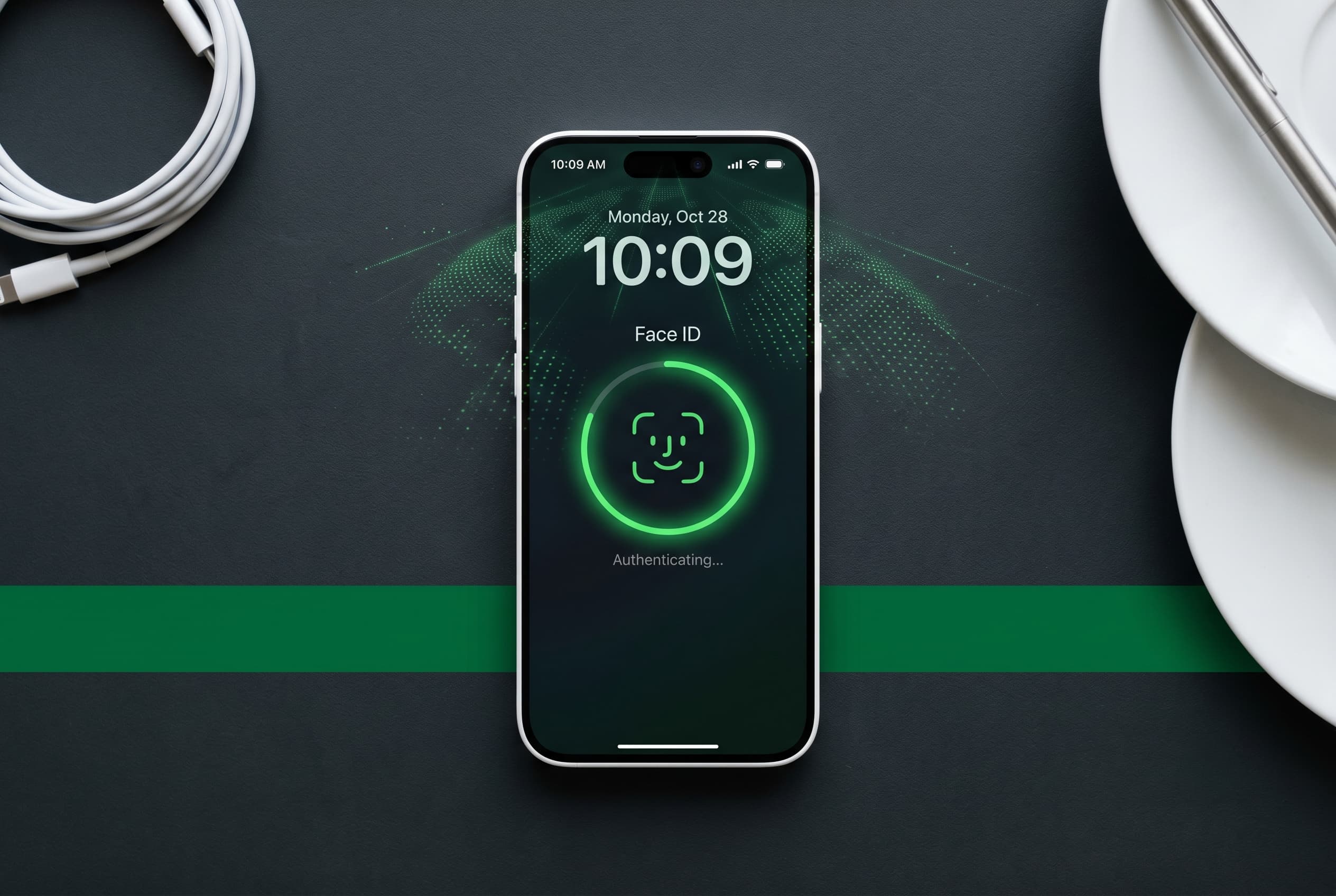
If you’ve owned an iPhone in the last several years, you’ve used Face ID. It’s Apple’s face-recognition system that replaced the home button fingerprint sensor, and it’s now on every iPhone Apple sells. But most people don’t know much about how it actually works, why it sometimes fails, or how to get more out of it.
This guide covers all of it: the technology, the history, every iPhone model that has Face ID, common problems with fixes, and tips to use it smarter.
Quick Answer / TL;DR
Face ID is Apple’s 3D face-scanning authentication system, launched with the iPhone X in 2017. It uses a TrueDepth camera to map your face with 30,000 invisible infrared dots. It’s faster and more secure than a PIN, works in the dark, and adapts to changes in your appearance over time. Every iPhone model since the iPhone X includes Face ID, including the iPhone 16e released in 2025.
Shopping for a used iPhone with Face ID? Browse verified iPhone listings on Swappa.
What Is iPhone Face ID?
Face ID is Apple’s biometric authentication system. It uses the TrueDepth camera system built into the front of your iPhone to create a precise 3D map of your face, then matches that map every time you unlock your phone, authenticate a purchase, or sign into an app.
It replaced Touch ID on most iPhones starting with the iPhone X in 2017. Rather than scanning your fingerprint via a home button sensor, Face ID captures a depth map of your face using infrared light. This happens in a fraction of a second, and the data never leaves your device.
How Face ID Technology Works
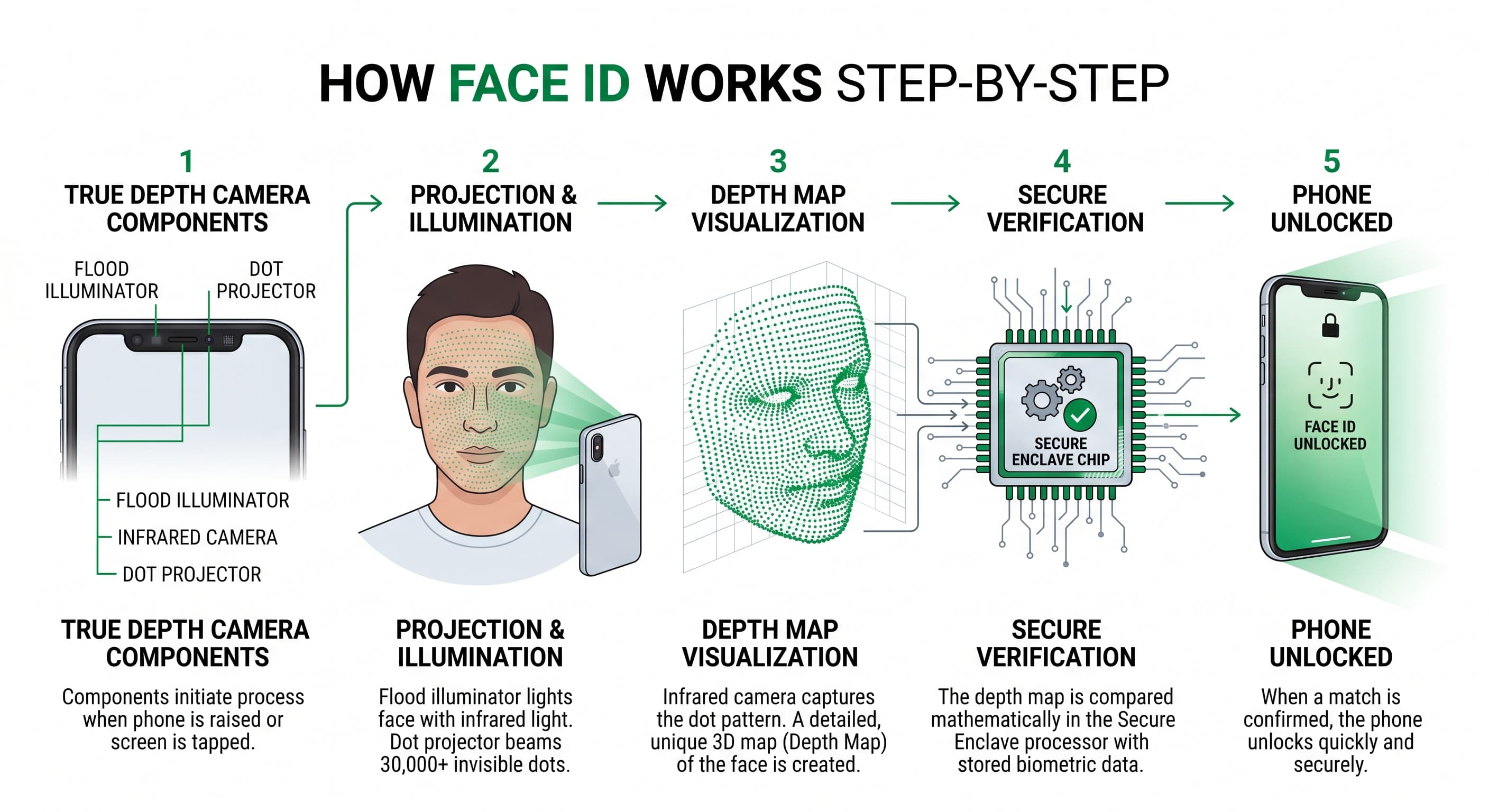
The TrueDepth camera system is the hardware backbone of Face ID. It sits inside the notch (or Dynamic Island on newer models) and contains several components working together:
- Dot projector: Projects 30,000 invisible infrared dots onto your face to create a depth map
- Infrared camera: Captures the dot pattern and an infrared image of your face
- Flood illuminator: Emits invisible infrared light so Face ID works in total darkness
- Front-facing camera: Captures a 2D image for additional context
When you first set up Face ID, your iPhone’s neural engine analyzes the depth map and creates a mathematical representation of your face, stored encrypted in the Secure Enclave chip. The Secure Enclave is isolated from the rest of the system. Face ID data never goes to Apple’s servers.
Each time you unlock your phone, the TrueDepth camera recaptures your face and compares it to the stored representation. The entire process takes under a second. Over time, Face ID updates its stored model to account for gradual changes in your appearance, like a new haircut, glasses, or aging.
The History of Face ID
2017 (iPhone X): Apple unveiled Face ID at the Steve Jobs Theater on September 12, 2017. The iPhone X was the first iPhone without a home button, and Face ID was the centerpiece of the announcement. Apple’s Phil Schiller called Touch ID “the past.” The system launched with a 1-in-1,000,000 false-acceptance rate (compared to 1-in-50,000 for Touch ID).
2018 (iPhone XS / XR): Apple improved Face ID speed through a faster neural engine. The A12 Bionic chip made unlock noticeably quicker. The iPhone XR brought Face ID to a more affordable price point for the first time.
2019 (iPhone 11 series): The TrueDepth camera gained a wider field of view, allowing Face ID to recognize you even at more extreme off-angle positions, such as when your phone is lying flat on a table.
2020 (iPhone 12 series): No major hardware changes to Face ID itself, but the A14 Bionic chip improved processing speed. Mask unlock support was still not yet available at launch.
2021 (iPhone 13 series): Apple reduced the notch size by 20%. More significantly, iOS 15.4 (released in 2022) introduced Face ID with a mask, allowing recognition even when your nose and mouth are covered, without requiring an Apple Watch. This feature works on iPhone 12 and later.
2022 (iPhone 14 Pro / Pro Max): Apple replaced the traditional notch with the Dynamic Island, a pill-shaped cutout that houses the TrueDepth sensors and serves as a multitasking UI element. Face ID performance remained consistent but the hardware integration became more elegant.
2023 (iPhone 15 series): Dynamic Island expanded to all iPhone 15 models, not just Pro. All iPhones now share the same Face ID sensor placement.
2024 (iPhone 16 series): Further speed improvements through the A18 chip. Face ID is faster and more reliable in challenging lighting conditions.
2025 (iPhone 16e and iPhone 17 series): The iPhone 16e, released February 28, 2025, completed Apple’s transition: every iPhone Apple sells now includes Face ID. The SE line’s Touch ID era is officially over.
Every iPhone with Face ID
Here’s the complete list of iPhones with Face ID, from the original to the current lineup.
| iPhone Model | Release Year | Notable Face ID Features |
|---|---|---|
| iPhone X | 2017 | First Face ID iPhone, original TrueDepth camera |
| iPhone XS | 2018 | Faster A12 neural engine |
| iPhone XS Max | 2018 | Larger 6.5″ OLED, same Face ID hardware |
| iPhone XR | 2018 | Face ID on LCD, more affordable entry point |
| iPhone 11 | 2019 | Wider off-axis recognition angle |
| iPhone 11 Pro | 2019 | Triple camera, improved neural engine |
| iPhone 11 Pro Max | 2019 | Larger form factor |
| iPhone 12 | 2020 | 5G, smaller notch |
| iPhone 12 mini | 2020 | Compact 5.4″ with Face ID |
| iPhone 12 Pro | 2020 | LiDAR scanner added |
| iPhone 12 Pro Max | 2020 | Sensor-shift OIS |
| iPhone 13 | 2021 | 20% smaller notch |
| iPhone 13 mini | 2021 | Last mini model to date |
| iPhone 13 Pro | 2021 | ProMotion 120Hz display |
| iPhone 13 Pro Max | 2021 | Largest battery of its generation |
| iPhone 14 | 2022 | Same A15 chip as 13 Pro |
| iPhone 14 Plus | 2022 | 6.7″ non-Pro for first time |
| iPhone 14 Pro | 2022 | Dynamic Island debut |
| iPhone 14 Pro Max | 2022 | Always-On Display |
| iPhone 15 | 2023 | Dynamic Island on all models, USB-C |
| iPhone 15 Plus | 2023 | USB-C, larger battery |
| iPhone 15 Pro | 2023 | Titanium frame, Action Button |
| iPhone 15 Pro Max | 2023 | Tetraprism zoom lens |
| iPhone 16 | 2024 | Camera Control button, A18 chip |
| iPhone 16 Plus | 2024 | A18 chip, larger display |
| iPhone 16 Pro | 2024 | A18 Pro, larger display sizes |
| iPhone 16 Pro Max | 2024 | Largest Pro display at 6.9″ |
| iPhone 16e | 2025 | Replaces SE line, most affordable Face ID iPhone |
| iPhone 17 | 2025 | Latest generation |
| iPhone 17 Air | 2025 | Ultra-thin design |
| iPhone 17 Pro | 2025 | Latest Pro tier |
| iPhone 17 Pro Max | 2025 | Latest flagship |
Note: iPhone SE (1st, 2nd, and 3rd generation) all use Touch ID, not Face ID. The SE line ended with the introduction of the iPhone 16e.
Common Face ID Problems and How to Fix Them
Face ID is reliable, but it does fail. Here are the most common issues and what to do about them.
Face ID Says “Not Available” or “Try Again”
This usually means the TrueDepth camera is obstructed or there’s a software glitch.
Fix:
- Clean the front camera area with a soft microfiber cloth. Even a thin film of grease can interfere with the infrared sensors.
- Remove any screen protector that covers the TrueDepth camera area. Thick or low-quality protectors are a frequent culprit.
- Make sure your face is between 10 and 20 inches from the phone.
- Restart your iPhone (hold Side button + Volume Down, then slide to power off).
Face ID Keeps Asking for Passcode
After five failed Face ID attempts, iOS falls back to your passcode automatically. This is by design and a security feature, not a bug. But if it’s happening constantly:
Fix:
- Go to Settings > Face ID & Passcode > Reset Face ID.
- Re-enroll your face, making sure to move your head in a full circle both times the setup asks.
- Set up an Alternate Appearance if you wear glasses or dramatically change your look regularly.
Face ID Not Working After iOS Update
Software updates occasionally reset Face ID settings or introduce bugs.
Fix:
- Go to Settings > Face ID & Passcode and confirm Face ID is enabled for the features you want (iPhone Unlock, Apple Pay, App Store, etc.).
- If it shows “Face ID is not set up,” re-enroll.
- If the option is grayed out or missing entirely, try Settings > General > Software Update to check for a patch. Apple typically releases fixes quickly for Face ID regressions.
Face ID Slow or Inconsistent
This can happen after a major iOS update or if your stored face data is outdated.
Fix:
- Reset Face ID (Settings > Face ID & Passcode > Reset Face ID) and re-enroll fresh.
- Make sure your iPhone isn’t overheating. Extreme temperatures slow down the neural engine.
Face ID Won’t Work with a Mask
Face ID with mask requires iPhone 12 or later and iOS 15.4 or higher.
Fix:
- Go to Settings > Face ID & Passcode > enable “Face ID with a Mask.”
- You may need to re-enroll Face ID with the mask toggle on for best results.
Face ID Stopped Working After Screen Repair
This is a known issue with third-party screen repairs. Apple’s TrueDepth camera is linked to your iPhone’s logic board at a hardware level. If a non-Apple technician replaces the screen and disturbs the front camera assembly, Face ID can stop working permanently on older models.
Fix: For Face ID repairs involving the TrueDepth camera hardware, Apple or an Apple Authorized Service Provider is the only path to full restoration.
Tips to Get More Out of Face ID
Set up an Alternate Appearance. Face ID supports two appearances. Use this if you dramatically change your look (shaving a full beard, switching between glasses and contacts), or to let a trusted person unlock your phone in an emergency. Go to Settings > Face ID & Passcode > Set Up an Alternate Appearance.
Re-enroll after major appearance changes. Face ID adapts gradually, but a sudden big change (like shaving your head) can cause repeated failures. Reset and re-enroll to avoid friction.
Hold your phone at the right distance. Face ID works best between 10 and 20 inches from your face. Too close or too far, and the system struggles.
Use it in landscape mode. Starting with iOS 16, Face ID works in landscape orientation on iPhone 14 Pro and later. If you use your phone sideways often, make sure it’s enabled.
Don’t cover your eyes. Face ID requires your eyes to be open and visible by default (this is intentional, to prevent unlock while you’re asleep). You can disable “Require Attention for Face ID” in settings, but this reduces security.
Keep your camera area clean. A routine wipe of the TrueDepth camera area with a microfiber cloth takes two seconds and prevents most of the day-to-day failures people attribute to bugs.
Pair with Apple Watch for mask situations. Before Apple introduced native mask support, the Apple Watch unlock workaround was the only option. It still works and can be useful as a backup if mask unlock isn’t cooperating.
Buying a Used iPhone with Face ID: What to Check
The checklist below is relevant if you are purcashing an iPhone from someone in person. Phones on Swappa are required to be fully functional to be listed. If a seller on Swappa sends you an iPhone with faulty Face ID, we expect them to accept a return for a refund.
If you’re buying a used iPhone in person and want to confirm Face ID works before you commit, here’s what to look for:
- Ask the seller to demonstrate Face ID before you finalize the purchase. A working Face ID unlock in person is the best confirmation.
- Check for screen repair history. Third-party screen repairs can disable Face ID permanently on some models. Ask directly.
- Verify the phone isn’t in Lost Mode or Activation Locked. Face ID won’t save you if the previous owner’s Apple ID is still tied to the device. An Activation Lock check is essential.
- Test it in different conditions. Try unlocking in bright light and dim light to spot any TrueDepth sensor issues.
On Swappa, every listing goes through staff review before it’s published. Sellers have to disclose condition, and buyers are protected by PayPal. It’s the cleanest way to buy a used iPhone without worrying about what you’re getting.
FAQ: iPhone Face ID
What iPhones have Face ID?
Every iPhone from the iPhone X (2017) onward has Face ID, including the iPhone 16e released in 2025. The only iPhones without Face ID are the SE models (1st, 2nd, and 3rd generation), which use Touch ID instead.
Is Face ID secure?
Yes. Apple claims a 1-in-1,000,000 false-acceptance rate for Face ID, compared to 1-in-50,000 for Touch ID. The system uses a 3D depth map, not a 2D photo, so a photo of your face cannot unlock your phone. All face data is stored locally in the Secure Enclave chip and never sent to Apple.
Can someone unlock my iPhone with Face ID while I’m asleep?
Not by default. Face ID requires your eyes to be open and attention directed at the screen. You can turn off “Require Attention for Face ID” in settings, which would make it easier for someone to unlock your phone without your awareness. Leave it on.
Does Face ID work with glasses or sunglasses?
Yes. Face ID works with most prescription glasses and many sunglasses. Certain sunglasses with polarized lenses can block the infrared sensors and cause failures. If your sunglasses interfere, you can add an Alternate Appearance wearing them.
What happened to Face ID after Apple removed the notch?
The TrueDepth sensors moved into the Dynamic Island, the pill-shaped cutout Apple introduced on the iPhone 14 Pro and brought to all models with the iPhone 15. The sensors work identically, just repositioned.
Does Face ID work with Face ID on a mask?
Yes, on iPhone 12 or later running iOS 15.4 or later. Go to Settings > Face ID & Passcode and enable “Face ID with a Mask.” Performance is slightly less reliable than unmasked, so keep your passcode handy.
Conclusion
Face ID has gone from a flagship novelty to the default way every iPhone user unlocks their device. Understanding how it works, why it fails, and how to get more out of it makes a real difference in day-to-day use.
If you’re looking to buy a used iPhone with Face ID, Swappa is where to start. Every listing is staff-reviewed, there are no fees for buyers, and PayPal protection covers every purchase. You can shop by model, storage, carrier, and condition, so you only see phones that match what you actually need.