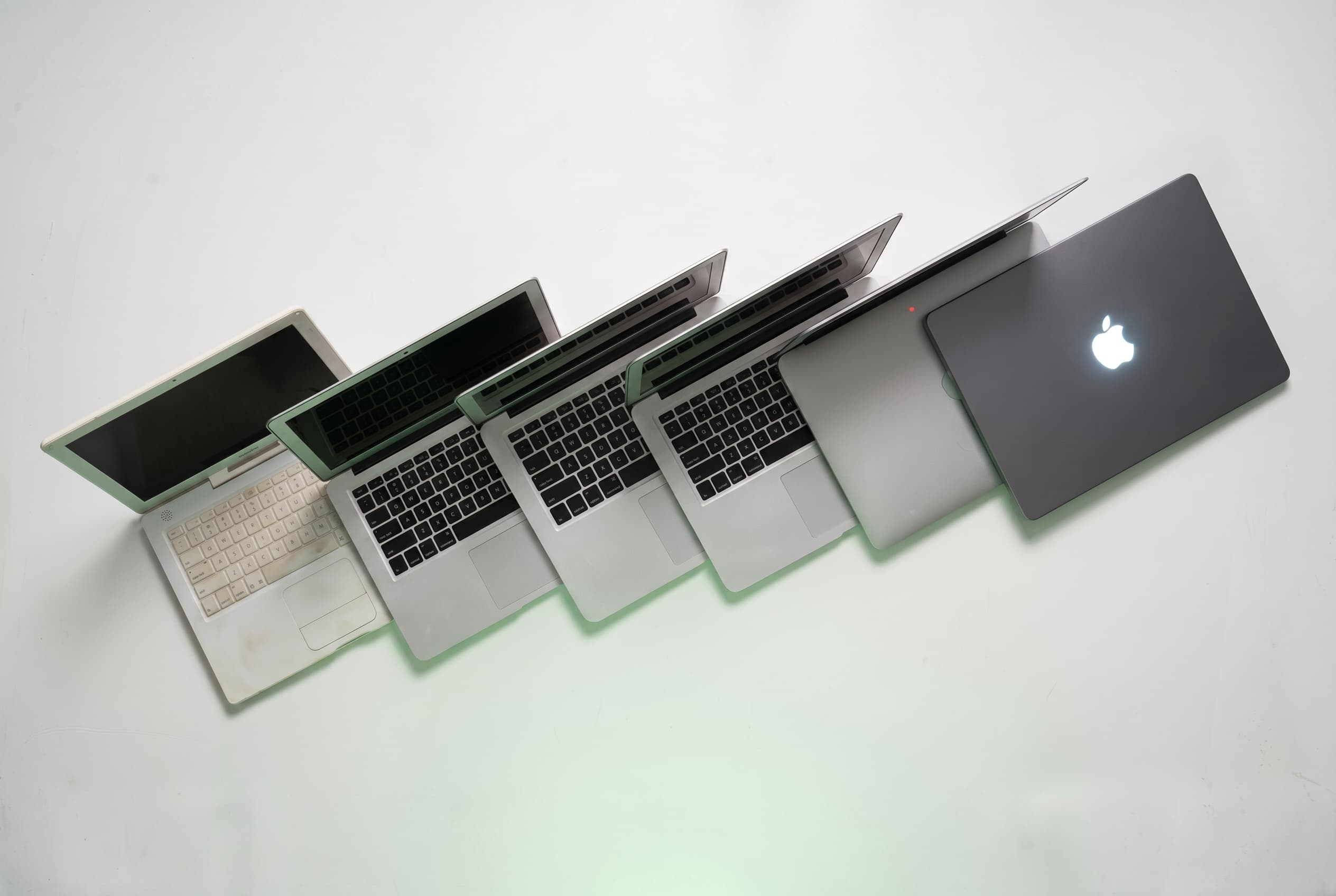
The MacBook has been redefining what a laptop can be for two decades. From the polycarbonate white clamshell that replaced the iBook in 2006, to today’s M5-powered ultrabooks and the new entry-level MacBook Neo, Apple’s laptop lineup has gone through more reinventions than almost any other product in consumer electronics.
Understanding that history isn’t just interesting — it’s useful. Knowing which generation introduced which features, where performance jumped, and where Apple cut corners tells you exactly which used MacBook to buy (or how to price the one you’re selling).
Quick Answer / TL;DR
The MacBook launched in May 2006 as Apple’s first Intel-powered consumer laptop. Key eras: polycarbonate Intel era (2006–2011), the MacBook Air revolution (2008–present), the Retina Pro generation (2012–2019), the ultralight 12-inch experiment (2015–2019), and the Apple Silicon era (2020–present). Today’s lineup runs M5 chips across the MacBook Air and MacBook Pro, with a new entry-level MacBook Neo starting at $599. For used buyers, the M1 generation (2020) remains the sweet spot for value. Shop verified used MacBooks on Swappa’s MacBook listings.
Before the MacBook: The PowerBook and iBook Era
To understand why the MacBook mattered, you need to know what came before it.
Apple’s laptop line in the late 1990s and early 2000s was split into two tiers. The PowerBook was the pro machine — titanium and aluminum chassis, high price, aimed at creative professionals. The iBook was the consumer model — plastic, colorful, more affordable, and extremely popular in schools.
Both ran on PowerPC processors, a chip architecture Apple had used since 1994 in partnership with IBM and Motorola. PowerPC was capable, but by the mid-2000s it was struggling to keep pace with Intel’s roadmap. The chips ran hot, battery life suffered, and the pipeline for future generations looked uncertain.
At WWDC 2005, Steve Jobs dropped a bombshell: Apple was switching the entire Mac lineup to Intel processors. He gave developers one year to prepare. The industry expected the transition to take two years. Apple finished in less than one.
2006: The First MacBook Arrives
Apple introduced the first MacBook Pro in January 2006: a 15-inch machine with an Intel Core Duo processor that replaced the PowerBook G4. Two months later came the MacBook, announced in May 2006, replacing the iBook and the 12-inch PowerBook.
The original MacBook was a polycarbonate laptop available in white and black. The black model was a premium upsell (same specs, just darker). Starting price was $1,099, which positioned it squarely as the affordable end of Apple’s laptop range.
What made it notable:
- First Apple laptop with an Intel processor in the consumer lineup
- Introduced the MagSafe magnetic power connector, one of Apple’s most beloved (and later abandoned, then revived) hardware decisions
- Built-in iSight camera, making video calls standard equipment before anyone called it “remote work”
- Glossy display replacing the matte screens of the iBook era
The performance jump over PowerPC was significant. Apple’s Rosetta translation layer let older PowerPC software run on the new Intel chips, smoothing the transition for users. By August 2006, the entire Mac product line had moved to Intel, a full year ahead of Jobs’ original promise.
2008: The MacBook Air Changes Everything
On January 15, 2008, Steve Jobs walked onto a stage at Macworld and pulled a laptop out of a manila envelope. The MacBook Air was 0.76 inches at its thickest point and weighed 3 pounds. The audience gasped.
The MacBook Air wasn’t the most powerful laptop Apple made. It had one USB port, no optical drive, and a slower processor than the MacBook Pro. Critics called it underpowered and overpriced at $1,799.
They weren’t wrong, exactly. But they missed the point.
The MacBook Air was a proof of concept: that thinness, lightness, and a premium unibody aluminum chassis could be the primary value proposition of a laptop. Apple had bet that the optical drive was dead, that wireless was good enough for everything else, and that customers would pay for portability.
That bet paid off. The MacBook Air’s design philosophy eventually became the default for the entire laptop industry.
2008–2012: Unibody Aluminum and the Pro Redesign
While the Air established the thin-and-light vision, the MacBook Pro was getting its own overhaul.
In late 2008, Apple introduced the unibody aluminum construction — a single piece of machined aluminum forming the chassis of both the MacBook Pro and a newly redesigned MacBook. This was a manufacturing leap. Unibody machines were stronger, cooler-looking, and had a rigidity that plastic laptops couldn’t match.
This era also brought:
- Backlit keyboards as standard across more models
- The glass trackpad with no physical button (the entire surface clicked)
- Introduction of DisplayPort and Mini DisplayPort connectors
- Removal of FireWire from the consumer MacBook (which upset video professionals and eventually led Apple to reverse course on the Pro)
The MacBook lineup in 2010 settled into a recognizable pattern: MacBook (consumer, white polycarbonate), MacBook Air (thin and light premium), and MacBook Pro (performance, available in 13-inch and 15-inch). A 17-inch MacBook Pro also existed for users who needed maximum screen real estate.
Battery life improved steadily. Apple’s claims of 7–10 hours became more credible with each refresh.
2012: Retina Display and the Modern MacBook Pro
June 2012 was a turning point. Apple introduced the MacBook Pro with Retina display — a 15-inch machine with a 2880×1800 resolution screen, no optical drive, flash storage only, and a significantly thinner profile than its predecessor.
The Retina MacBook Pro was, at the time, the most advanced laptop Apple had ever made. It was also the most locked-down. RAM was soldered to the motherboard. Storage was a proprietary SSD, not a standard drive. The battery was glued in place.
Repairability advocates hated it. Users mostly loved it. The screen was genuinely stunning, and the solid-state storage made the machine feel fast in a way that spinning-disk laptops simply couldn’t match.
This generation set the template for what the MacBook Pro would be for the next decade: thin, powerful, beautiful, and non-upgradeable. If you’re buying used, this is the era where checking RAM and storage at purchase matters most — you cannot upgrade later.
| Year | Model | Processor | Max RAM | Display |
|---|---|---|---|---|
| 2012 | MacBook Pro 15″ Retina | Intel Core i7 | 16 GB | 2880×1800 Retina |
| 2013 | MacBook Air 13″ | Intel Core i5/i7 | 8 GB | 1440×900 |
| 2015 | MacBook Pro 13″/15″ | Intel Core i5/i7 | 16 GB | Retina |
| 2015 | MacBook 12″ | Intel Core M | 8 GB | 2304×1440 Retina |
| 2016 | MacBook Pro (Touch Bar) | Intel Core i5/i7 | 16 GB | Retina |
| 2019 | MacBook Pro 16″ | Intel Core i7/i9 | 64 GB | 3072×1920 Retina |
2015: The 12-Inch MacBook (An Experiment in Minimalism)
In 2015, Apple introduced a laptop with a single port: one USB-C connector that handled charging, data transfer, and display output. That was it.
The 12-inch MacBook was the thinnest and lightest Mac laptop ever made. It featured a fanless Intel Core M processor, a Force Touch trackpad, and a butterfly keyboard mechanism that Apple would spend years defending and eventually abandon.
The butterfly keyboard is one of the most controversial design decisions in MacBook history. It was flatter, quieter, and more prone to failure than any keyboard Apple had shipped before. Dust under a single key could render it unusable. Apple faced multiple class-action lawsuits and a repair program before finally returning to a scissor-switch mechanism in 2019.
The 12-inch MacBook itself was discontinued in 2019. It never found a clear market position: too underpowered for professionals, too expensive for casual users. But it did prove that a single-port laptop was viable and pushed the rest of the industry toward USB-C.
2016–2019: The Touch Bar Years (and a Controversial Chapter)
In late 2016, Apple refreshed the MacBook Pro with one of its most divisive features: the Touch Bar. This was a thin OLED strip that replaced the row of function keys, displaying context-sensitive controls that changed based on the app in use.
The Touch Bar had genuine fans, particularly in audio and video production workflows. But it also removed physical Escape and function keys that developers and power users relied on. Apple eventually brought back a physical Escape key in 2019, then eliminated the Touch Bar entirely in the 2021 redesign.
This era also brought:
- Mandatory USB-C/Thunderbolt 3 ports only (no USB-A, no SD card, no HDMI on most models)
- The “dongle life” meme as users paid for adapters to connect existing peripherals
- Thermal throttling issues on 2018 MacBook Pro models that Apple had to address with a software patch
These weren’t Apple’s finest years for MacBook hardware. The machines were thin and the screens were excellent, but keyboard reliability issues and port removal frustrated a loyal user base.
2019–2020: Course Correction Before the Big Shift
Apple spent 2019 and 2020 cleaning up before the most significant platform shift since 2006.
In late 2019, Apple released a 16-inch MacBook Pro with a redesigned scissor-switch keyboard, restored function keys, louder speakers, and better thermal management. It was essentially Apple acknowledging that the 2016–2018 Pro lineup had real problems and addressing them.
The 2020 Intel MacBook Pro 13-inch was similarly solid, and the MacBook Air received a well-regarded update with the new scissor keyboard and a $999 starting price.
Then, in November 2020, everything changed.
2020: Apple Silicon and the M1 Revolution
At WWDC 2020, Apple announced it was leaving Intel behind and building its own processors for the Mac — the Apple Silicon transition. The first chip: the M1.
In November 2020, Apple shipped three M1 machines: the MacBook Air, the MacBook Pro 13-inch, and the Mac mini. The reviews were not subtle. The M1 MacBook Air was faster than most Intel MacBook Pros. It ran cooler. Battery life stretched to 15–18 hours in real-world use. It cost $999.
The M1 chip used an ARM-based architecture similar to iPhone and iPad chips, but Apple’s implementation was orders of magnitude more powerful than what competitors had managed with ARM on laptops. Rosetta 2 (Apple’s translation layer for Intel apps) was fast enough that most users couldn’t tell the difference between native and translated software.
Key M1 MacBook specs:
- M1 chip: 8-core CPU, 8-core GPU
- MacBook Air M1: No fan, passively cooled, 18-hour battery life
- MacBook Pro 13″ M1: Active cooling, slightly faster sustained performance
- RAM options: 8 GB or 16 GB unified memory
- Starting price: $999 (Air), $1,299 (Pro 13″)
For used MacBook buyers, the M1 generation represents one of the best value propositions in laptop history. These machines are still fully capable for most tasks and can be found on Swappa at significant discounts compared to new.
2021: The MacBook Pro Redesign and Return of the Ports
October 2021 brought a MacBook Pro redesign that felt like Apple listening to its pro users for the first time in years. The 14-inch and 16-inch MacBook Pro arrived with:
- M1 Pro and M1 Max chips — serious performance jumps over the base M1
- HDMI port, SD card slot, and MagSafe charging returned after years of absence
- A Liquid Retina XDR display with ProMotion (up to 120Hz adaptive refresh)
- Three Thunderbolt 4 ports
- The Touch Bar: gone
- A notch at the top of the display (controversial, mostly a non-issue in practice)
The M1 Pro offered up to 10 CPU cores and 16 GPU cores. The M1 Max doubled the GPU cores to 32 and offered memory bandwidth that rivaled desktop workstations. For video editors, 3D artists, and audio engineers, these were the most capable laptops Apple had ever shipped.
2022–2023: M2 and M3 — Steady Refinement
Apple moved to a two-year chip cadence for the most part, with the M2 arriving in 2022 and the M3 family in late 2023.
The M2 MacBook Air (2022) introduced a redesigned chassis without the tapered wedge shape that had defined the Air since 2010. It was a flat-bottomed, more rectangular design available in four colors including Midnight (dark navy) and Starlight (gold-adjacent). The notch from the MacBook Pro came to the Air. MagSafe returned.
The M2 MacBook Pro 13-inch was less exciting — it kept the old chassis with the Touch Bar removed, which struck some observers as an awkward interim product.
M3 (late 2023) brought hardware ray tracing to the Mac, the first consumer-grade Mac chip with dedicated ray-tracing acceleration. The MacBook Pro line split into M3, M3 Pro, and M3 Max configurations across 14-inch and 16-inch sizes.
| Chip | Year | CPU Cores (Max) | GPU Cores (Max) | Key MacBook Models |
|---|---|---|---|---|
| M1 | 2020 | 8 | 8 | MacBook Air, Pro 13″ |
| M1 Pro / Max | 2021 | 10 / 10 | 16 / 32 | MacBook Pro 14″, 16″ |
| M2 | 2022 | 8 | 10 | MacBook Air, Pro 13″ |
| M2 Pro / Max | 2023 | 12 / 12 | 19 / 38 | MacBook Pro 14″, 16″ |
| M3 | 2023 | 8 | 10 | MacBook Air, Pro 14″ |
| M3 Pro / Max | 2023 | 12 / 14 | 18 / 40 | MacBook Pro 14″, 16″ |
| M4 | 2024 | 10 | 10 | MacBook Air, Pro 14″ |
| M4 Pro / Max | 2024 | 14 / 14 | 20 / 32 | MacBook Pro 14″, 16″ |
| M5 | 2026 | 10 | 10 | MacBook Air, Pro 14″ |
| M5 Pro / Max | 2026 | 18 / 18 | — | MacBook Pro 14″, 16″ |
2024–2025: M4 Arrives Across the Lineup
The M4 chip debuted in the iPad Pro in May 2024 before coming to the MacBook lineup later that year. The M4 MacBook Pro arrived in November 2024, and the M4 MacBook Air launched in March 2025.
The M4 MacBook Air brought the chip to Apple’s most popular laptop:
- Sky Blue added as a new color option alongside Midnight, Starlight, and Silver
- 12MP Center Stage camera (up from the previous 1080p)
- Starting at $1,099 for the 13-inch and $1,299 for the 15-inch
- Up to 18 hours of battery life
- 16 GB unified memory as the new baseline
The M4 Pro and M4 Max configurations in the MacBook Pro pushed memory bandwidth and GPU performance further, making them the go-to machines for high-end video production and machine learning workflows.
2026: M5, MacBook Neo, and the Current Lineup
As of mid-2026, Apple’s MacBook lineup has expanded to its widest range ever — and includes a genuinely surprising entry-level option.
MacBook Air (M5, 2026): Updated in March 2026, the M5 MacBook Air offers memory bandwidth of 153 GB/s (a 28% improvement over M4) and SSDs twice as fast as the previous generation, with configurations up to 4 TB storage. Pricing starts at $1,099 for the 13-inch and $1,299 for the 15-inch.
MacBook Pro (M5 Pro / Max, 2026): The 14-inch and 16-inch MacBook Pro received M5 Pro and M5 Max chips with an 18-core CPU — up from 14-core and 16-core designs in the M4 generation. These are the most powerful MacBook Pros ever shipped.
MacBook Neo (2026): The most interesting addition to the lineup in years. Apple’s new entry-level laptop starts at $599 ($499 for education), powered by the A18 Pro chip — the same chip that debuted in the iPhone 16 Pro in 2024. It’s the most affordable new Mac laptop Apple has ever sold, aimed squarely at students and first-time Mac users.
Current MacBook Lineup at a Glance
| Model | Chip | Starting Price | Best For |
|---|---|---|---|
| MacBook Neo | A18 Pro | $599 | Students, basic computing |
| MacBook Air 13″ | M5 | $1,099 | Everyday use, portability |
| MacBook Air 15″ | M5 | $1,299 | Everyday use, larger screen |
| MacBook Pro 14″ | M5 | ~$1,599 | Professionals, sustained workloads |
| MacBook Pro 16″ | M5 Pro/Max | ~$2,499+ | Power users, creative pros |
What MacBook History Means for Used Buyers
Twenty years of MacBook releases creates a rich secondary market — and knowing the generations helps you buy smart.
Best used value: M1 MacBook Air or M1 MacBook Pro (2020). These machines were a genuine leap forward and are still more than capable for most workflows. Battery health is the main thing to verify. Find them on Swappa’s MacBook listings with seller-verified condition and PayPal protection.
Avoid: Pre-2019 Intel MacBook Pros with butterfly keyboards. The keyboard failure risk is real. If you’re buying one, confirm it has been through Apple’s keyboard replacement program.
Good middle ground: M2 MacBook Air (2022). The flat chassis, MagSafe, and four color options make it a more refined machine than the M1 Air. Prices have dropped significantly since the M4 model launched.
Watch for: M3 MacBook Pros. As M5 machines push earlier generations onto the used market, M3 Pro and M3 Max configurations will offer genuinely professional-grade performance at used prices.
What to Check When Buying a Used MacBook
- Battery cycle count and health. Go to Apple Menu → About This Mac → System Report → Power. Under 500 cycles with 80%+ health is solid.
- Activation Lock / Apple ID status. The device should be signed out of the seller’s Apple ID. If it’s not, you cannot set it up.
- Physical condition. Check hinges, keyboard (especially on 2016–2018 butterfly models), and ports.
- Storage and RAM. These are not upgradeable on any MacBook made after 2015. Confirm the specs before buying.
- macOS version. Older Intel Macs may not support the latest macOS. Check Apple’s compatibility list.
If you’re upgrading from an older Mac, listing your current machine on Swappa is often worth significantly more than trading it in at Apple or selling through a big-box retailer. Real buyers, no fees on the buyer side, and PayPal protection on both ends.
FAQ: MacBook History and Buying Guide
What year did the first MacBook come out?
The original MacBook launched on May 16, 2006. It was a polycarbonate laptop with an Intel Core Duo processor, replacing Apple’s iBook consumer lineup. It was the first consumer Mac laptop to use Intel chips.
What is the difference between MacBook, MacBook Air, and MacBook Pro?
“MacBook” was originally the name for Apple’s mainstream consumer laptop. MacBook Air has been the thin-and-light line since 2008, now Apple’s most popular laptop. MacBook Pro targets performance users with more powerful chips, better displays, and professional port selections. The 12-inch MacBook (2015–2019) was a now-discontinued ultra-minimal line. As of 2026, the main lines are MacBook Neo (entry-level), MacBook Air, and MacBook Pro.
What is Apple Silicon and when did it come to MacBooks?
Apple Silicon refers to Apple’s in-house processors based on ARM architecture. The first Apple Silicon MacBooks shipped in November 2020 with the M1 chip. Previous MacBooks used Intel processors. The transition dramatically improved performance per watt and battery life.
Which MacBook generation is the best value on the used market?
The M1 MacBook Air (2020) is widely considered the best value on the used market. It marked a major performance leap, runs cool without a fan, and has 18-hour battery life. M2 MacBook Air (2022) is a step up in refinement. Both are available on Swappa at significant discounts versus new pricing.
Are older Intel MacBooks still worth buying in 2026?
It depends on the use case and price. Pre-2020 Intel MacBooks will eventually lose macOS update support, and some already have. For light use at very low prices, an Intel MacBook Air (2019–2020) can still work. Avoid Intel models from 2016–2018 with the butterfly keyboard. For anything requiring long-term software support, an M1 or newer is the smarter buy.
What is the MacBook Neo?
The MacBook Neo is Apple’s new entry-level laptop, introduced in March 2026. It starts at $599 ($499 for education) and runs on the A18 Pro chip — the same chip used in the iPhone 16 Pro. It’s the most affordable new Mac laptop Apple has ever offered and targets students and users who don’t need the full power of the MacBook Air or Pro lineup.
Conclusion: Two Decades of Reinvention
The MacBook story is one of constant reinvention — sometimes brilliant, sometimes frustrating, always influential. The Intel transition proved Apple could pull off a platform shift without losing its user base. The MacBook Air redefined what thin-and-light meant for the entire industry. Apple Silicon made the Mac the performance story of the early 2020s.
Today’s lineup, from the $599 MacBook Neo to the M5 Max MacBook Pro, covers more ground than ever. And every generation that Apple replaces creates opportunity on the used market.
Whether you’re buying your first Mac or upgrading from a machine a few years old, Swappa’s verified MacBook listings give you direct access to real sellers, staff-reviewed listings, and PayPal buyer protection on every transaction.