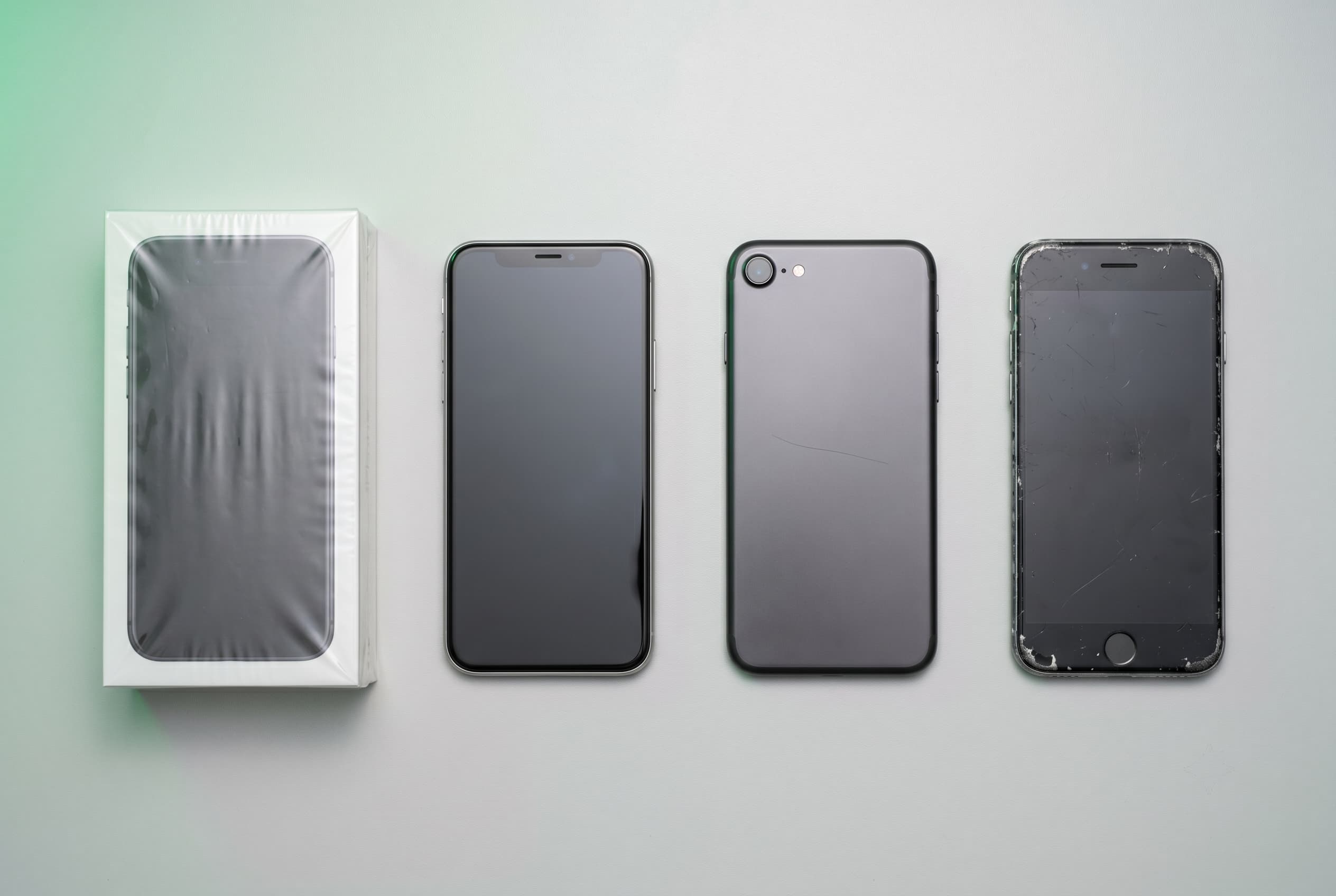
Condition grades are everywhere in the used electronics market, but they mean different things on different platforms. This hub explains what the standard grades cover, how to confirm a device works, which damage actually matters, and where battery health fits in. Use it as your starting point, then follow the links into each deeper guide.
Quick Answer
On Swappa, most items list as New (factory sealed), Mint (pristine, no wear), Good (excellent, minor wear), or Fair (noticeable wear, fully functional). Some categories use a simpler New or Used scale, and several add accessory requirements at each grade. A grade describes cosmetic state, not whether the device works, so always check function, damage, and battery health separately.
What a Condition Grade Actually Covers
A condition grade is shorthand for how a used device looks. It tells you how much cosmetic wear to expect on the screen, body, and corners. It does not tell you whether the cameras focus, the buttons respond, or the battery still holds a charge.
That distinction matters because the two get blurred constantly. A device can look flawless and have a tired battery, or look rough and run perfectly. To judge a used device fully, you need four separate reads: the grade, a functional test, a damage check, and the battery health. This hub covers each one and routes you to the full guide.
The used electronics market has no universal grading standard either. Mint on one platform can mean something looser on another. On Swappa, grades follow a defined set of condition requirements and listings are reviewed by staff before they go live, which is a meaningful difference from auction-style platforms where grading is entirely self-reported. The rest of this hub uses Swappa’s official scale as the reference point.
The Swappa Condition Grade Scale: New, Mint, Good, Fair
Most items on Swappa list as New, Mint, Good, or Fair. New describes a factory-sealed device. The other three are used grades that describe how much cosmetic wear to expect. Every used grade below assumes a device that works fully, since condition refers to appearance, not performance.
New means unopened and factory sealed. It has never been set up or used. This is the only grade that guarantees an untouched device, and it carries the highest price of the four.
Mint means pristine, with no wear on the screen, body, or corners. The device has been used but looks like new. The original charger, retail packaging, and manuals are not required for a phone or tablet to list as Mint. For buyers, Mint is the closest you get to new without the new-device premium. For sellers, a case and screen protector from day one is what protects a Mint grade.
Good is the most common grade in the used market. The device is in excellent shape but shows minor wear: small surface scratches, light corner scuffs, or slight button fade. The charger and packaging are not required. For most buyers, Good is the value sweet spot, since the device performs identically to Mint at a lower price.
Fair means the device works fully but shows noticeable wear, such as visible display scratches or a worn finish across the body. The charger and packaging are not required. It is a legitimate choice for budget-focused buyers, especially for a device headed straight into a case. Sellers should price Fair devices toward the lower end of the range for that model.
| Grade | Cosmetic Condition | Functional Condition | Relative Price |
|---|---|---|---|
| New | Unopened, factory sealed | Untouched | Highest |
| Mint | No visible wear | Fully functional | High |
| Good | Minor scratches and scuffs | Fully functional | Mid-range |
| Fair | Noticeable wear throughout | Fully functional | Lowest |
The cosmetic tiers above describe phones and tablets, which is the most common case. Many other categories use the same New/Mint/Good/Fair scale but add accessory requirements. Laptops, iMacs, and Mac minis require the power cord at every used grade. Game consoles include the power cord and a controller at every used grade, with an HDMI cable and OEM controller also required at Mint. Cameras require a working battery at all grades, and camera lenses must have flawless glass regardless of cosmetic tier.
A few categories drop the cosmetic tiers entirely and list only as New or Used, including GPUs, drones, and audio gear. For these, Used simply means removed from the box and functional. Sneakers follow the same idea: New (unworn) or Used (lightly worn, no holes, tears, major stains, or structural defects). Whatever the category, all listings must also meet Swappa’s broader Listing Device Criteria.
Prices vary by model, storage, carrier, and demand. Check current ranges on Swappa’s pricing pages. For the grade-by-grade breakdown, category-specific requirements, example photos, and edge cases, see the full grades guide.
Swappa uses these specific used electronics condition grades.
Test the Device, Not Just the Grade
A grade says nothing about whether the screen responds correctly, the cameras focus, the speakers work, or the charging port is solid. Those are functional questions, and they call for a hands-on test.
Before you buy, study the seller’s photos and ask about anything unclear. When the device arrives, test it thoroughly: every button, both cameras, cellular and Wi-Fi, Bluetooth, speakers, microphone, and the charging port. Confirm the display has no dead pixels or unresponsive touch zones.
For sellers, a full functional test is not just good practice, it is a Swappa listing requirement. Devices must be fully functional with no undisclosed faults, listings are staff-reviewed, and an undisclosed problem is grounds for a return. Work through the testing checklist before you list.
Learn How to Test a Used Device Before Buying
Refurbished, Open Box, Certified Pre-Owned, Like New
Beyond Swappa’s New, Mint, Good, and Fair grades, the wider market uses refurbishment and condition labels that mean very different things depending on who is applying them. These are industry terms, not Swappa grades, and knowing the difference prevents surprises at checkout.
Refurbished usually means a device was returned, inspected, repaired if needed, and repackaged. It can come from the manufacturer, a carrier, or a third party, and quality varies by source. Certified Pre-Owned (CPO), most common in the carrier market, signals a functional inspection and often a short warranty, with standards that differ by carrier.
Open Box means the packaging was opened but the device may have seen little or no use, often a retail return where nothing was wrong. Like New and Excellent are informal peer-to-peer terms with no standardized definition, so their meaning depends entirely on the seller.
For how these labels compare, what a warranty actually covers, and how to read between the lines of a listing description, see the terminology guide.
Refurbished vs. Open Box vs. Like New: What Each Term Means
Cosmetic vs. Functional Damage: What Matters
Not all damage is equal. A hairline scratch on the back panel has no effect on performance. A hairline crack across the display can fail the touch layer within weeks. Knowing the difference protects buyers and helps sellers price and disclose accurately.
Cosmetic damage affects appearance only: scratches and scuffs on the back or sides, finish wear around buttons, minor surface marks. A device with cosmetic damage is still fully capable. Functional damage affects how the device works: cracked display glass that degrades touch, a bent frame that strains the display connection, an intermittent charging port, or any sign of water exposure.
Swappa’s listing criteria prohibit devices with cracked glass or water damage outright. Any Swappa listing that passes review should be free of both, which is the platform’s baseline. If a device is damaged or non-functional, the right next step is buying a replacement, not relisting it.
Learn the difference between Cosmetic vs Functional Damage on Used Devices.
How Battery Health Factors Into Condition
Battery health is its own read, separate from the cosmetic grade. A device can look Mint with a worn battery or look Fair with a healthy one, and most grades do not account for the battery unless the seller discloses it.
Lithium-ion batteries lose capacity with each charge cycle, so a used device will rarely sit at 100%. Lower battery health is normal and perfectly fine as long as the device is fully functional. On iPhones, check Settings > Battery > Battery Health and Charging for maximum capacity. On Android, the metric varies by manufacturer, so ask the seller.
Swappa sets no minimum battery-health percentage to list. The requirement is a fully functional battery, one that charges and discharges normally. iPhone sellers must disclose when battery health is below 80% and the Apple battery service message is showing. As a buyer, check the listed battery health and factor a possible future replacement into your offer.
For how to read the numbers across device types and price battery condition into a deal, see the battery health guide.
Battery Health in Used Electronics: What to Know
How Swappa Handles Condition
Swappa’s listing process requires sellers to grade accurately and provide real photos, and staff review listings before they go live. Listings that do not meet the standard are not approved.
The criteria are specific: a clean IMEI or ESN, fully paid off, no activation or OS lock, no cracked glass, no water damage, and a fully functional battery. Buyers are protected, too. If a device arrives not as described, including a condition mismatch, you are entitled to a return and refund, and sellers must accept returns on not-as-described items.
Payments run through PayPal, with buyer and seller protection and dispute resolution (Stripe for select sellers). Fees are a flat 3% buyer fee and 3% seller fee, lower than auction-site fees, with payment processing applied separately. Questions get answered by human support, 24/7/365, with a typical response around 20 minutes.
Upgrading? Once your old device is wiped and fully functional, you can list it on Swappa and reach real buyers. Browse used phones and used laptops to see graded listings with seller photos.
Frequently Asked Questions
Q: What condition grades does Swappa use?
Most items list as New, Mint, Good, or Fair. New is factory sealed; Mint is pristine with no wear; Good shows minor wear; Fair shows noticeable wear. Some categories use a simpler New or Used scale (such as GPUs, drones, and audio), and several add accessory requirements at each grade.
Q: What does Mint condition mean for used electronics?
On Swappa, Mint means a used device that is pristine, with no visible wear on the screen, body, or corners. The charger and original packaging are not required for a phone or tablet to list as Mint. It looks new despite being used and commands the highest price of the used grades.
Q: Is Good condition actually good for used devices?
Yes. Good is the most common grade in the used market and usually the best value. The device is in excellent shape with only minor cosmetic wear, it is fully functional, and the discount versus Mint is meaningful. Most buyers are happy with Good condition.
Q: How is refurbished different from used?
A refurbished device has been inspected and repaired before resale, often by the manufacturer, a carrier, or a certified third party, and frequently carries a short warranty. A used device is typically sold as-is by the original owner. See the refurbished vs. open box vs. like new guide for the full comparison.
Q: Does a condition grade include battery health?
Not usually. Grades cover cosmetic state, and battery health is a separate factor a seller may or may not disclose. On Swappa, sellers must disclose when an iPhone’s battery health is below 80% and the Apple service message is showing. When in doubt, ask before buying.
Q: What condition damage disqualifies a device from being sold on Swappa?
Cracked glass and water damage are the two hard disqualifiers. Devices with either cannot be listed, regardless of whether they otherwise work. Swappa also requires a clean IMEI or ESN, no activation lock, and a fully functional battery.
Q: Can I return a used device if the condition does not match the listing?
Yes. On Swappa, if a device arrives not as described, including a condition mismatch, you are entitled to a return and refund, and sellers must accept returns on not-as-described items. Buyer’s remorse returns are at the seller’s discretion.
The Bottom Line
Condition grades give the used electronics market a shared language, but they are only the cosmetic layer. To judge a device fully, check function, damage, and battery health on their own, then weigh all four against the price. On Swappa, staff-reviewed listings and a clear return policy take much of the guesswork out.
If you are buying, treat the grade as a starting point, then study photos, ask questions, and test on arrival. If you are selling, grade honestly, disclose everything, and price for the real condition. It prevents disputes and builds the trust that leads to faster sales.
Browse graded used electronics on Swappa across phones, laptops, tablets, and more.