Buying a used phone from a stranger comes with one real risk that most people overlook: the phone could be stolen or carrier-blacklisted, which means it won’t activate on any major network. The good news is that a free IMEI check takes about 30 seconds and tells you everything you need to know.
Here’s how to find a phone’s IMEI and check its status before you buy.
Quick Answer
Run a free IMEI check at swappa.com/imei. Enter the phone’s IMEI number (dial *#06# on the device to find it), and Swappa will tell you whether the device is clean (allowed) or blacklisted (blocked). If it’s blocked, don’t buy it.
What Is an IMEI Number?
IMEI stands for International Mobile Equipment Identity. It’s a unique 15-digit serial number assigned to every cellular device, similar to a VIN on a car. Carriers use the IMEI to identify devices on their networks, and they can add it to a blocklist if the phone is reported lost, stolen, or tied to an unpaid account.
A clean IMEI means the phone is free to activate. A blocked IMEI means you’re likely buying a very expensive brick.
Some phones, particularly newer iPhones (iPhone XR and later), have two IMEI numbers: one for the physical SIM slot (IMEI1) and one for the eSIM (IMEI2). Check both.
How to Find a Phone’s IMEI Number
You don’t need to dig through settings menus. The fastest method works on any phone, regardless of brand or operating system.
Universal method (fastest):
- Open the Phone (dialer) app
- Dial
*#06# - The IMEI will appear on screen immediately, no need to press call
Alternative methods by platform:
- iPhone: Settings > General > About > scroll to IMEI
- Android: Settings > About Phone > Status > IMEI Information
- Physical label: Check under the battery (older phones), on the SIM tray, or on the original box
If you’re evaluating a phone before purchasing in person, use the dialer method. It’s instant and works everywhere.
How to Check a Phone’s IMEI on Swappa
Swappa offers a free IMEI checker at swappa.com/imei, powered by marketplace data and industry partners. It’s one of the most complete free checks available because it cross-references both carrier blacklist data and Swappa’s own listing history.
Steps:
- Go to swappa.com/imei
- Enter the IMEI number in the “IMEI or TAC” search field
- Click the search icon
- Review the results
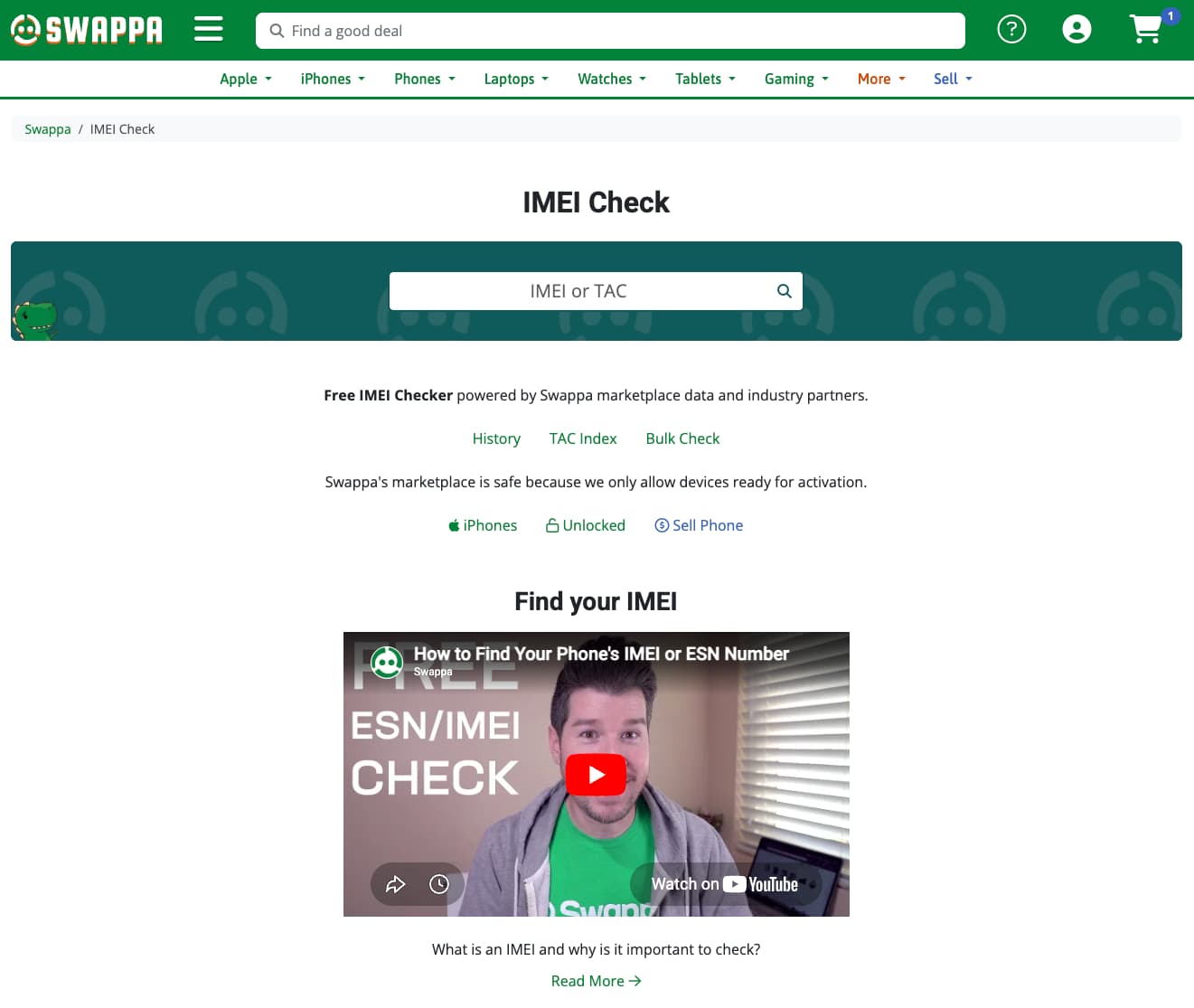
Results come back quickly and include the device’s ESN/IMEI status, model details (storage, color, carrier), network band support, and a Swappa listing history showing whether the device has ever been bought or sold on the marketplace.
What IMEI Check Results Mean
| Result | What It Means | Should You Buy? |
|---|---|---|
| Allowlist (Clean) | Device is not reported lost, stolen, or blacklisted. Ready for activation. | Yes |
| Blocklist (Blocked) | Reported lost/stolen, or tied to an unpaid carrier balance. Will not activate on major networks. | No |
| Unknown | Not enough data to make a determination. Could be a very new device. | Proceed with caution |
| TAC Only | Only the device model information is available (no IMEI-level status). | Verify with carrier before buying |
A blocked IMEI can sometimes be resolved if the original owner pays their outstanding balance, but you should never count on that when buying. If a phone is blocked, walk away.
What Happens If You Buy a Stolen Phone?
A stolen or blacklisted phone won’t activate on AT&T, T-Mobile, Verizon, or most MVNOs that rely on those networks. In some cases, the original owner can remotely lock the device via Find My (iPhone) or Find My Device (Android), making it completely unusable.
Beyond the inconvenience, buying a stolen phone means the money you paid is gone. Most private-sale platforms offer little to no recourse if you end up with a bad device. This is one of the biggest differences between buying on Swappa versus buying on platforms like Craigslist or Facebook Marketplace.
How Swappa Protects Buyers
When you buy a used phone on Swappa, the IMEI check has already been done. Swappa staff review every listing before it goes live, and devices with blocked IMEIs are not allowed on the marketplace. You’re not left doing the verification yourself.
Additional buyer protections on Swappa:
- Staff-reviewed listings: Staff reviews phone listings before approval
- Low fees: Low fees keep prices competitive and affordable
- PayPal protection: Transactions are covered by PayPal Purchase Protection
- Seller verification: Sellers have profiles, transaction history, and ratings
Upgrading your old device? You can list your phone on Swappa and reach real buyers without worrying about lowball offers or no-shows.
Should Sellers Run an IMEI Check Too?
Yes. If you’re selling a device you received as a gift, purchased secondhand, or inherited from someone else, it’s worth confirming its IMEI status before listing. If there’s an issue you don’t know about, finding out before you list saves everyone time.
Swappa will catch a blocked IMEI during the review process anyway, but checking ahead of time means no surprises. Use the same free tool at swappa.com/imei.
FAQ
What is an IMEI check and why does it matter?
An IMEI check verifies whether a phone’s unique device identifier has been reported lost, stolen, or blacklisted by a carrier. A blocked IMEI means the phone can’t be activated on major networks. Running a check before buying a used phone is the single most effective way to avoid buying a device that won’t work.
How do I find my phone’s IMEI number?
The fastest method is to open the Phone app and dial *#06#. The IMEI will appear on screen immediately. On iPhones, you can also find it under Settings > General > About. On Android, check Settings > About Phone > Status.
Is Swappa’s IMEI check actually free?
Yes. The Swappa IMEI checker is completely free and doesn’t require an account. Enter any IMEI or TAC code and get instant results including device status, model details, and Swappa listing history.
What’s the difference between IMEI and ESN?
ESN (Electronic Serial Number) is an older identifier used by CDMA carriers like Verizon and Sprint. Most modern phones use IMEI instead. The terms are often used interchangeably when talking about “clean” vs. “bad” device status, but IMEI is the current standard for all major networks.
Can a blocked IMEI be unblocked?
Sometimes. If a phone was blocked due to an unpaid carrier balance (rather than theft), it can be unblocked once the balance is paid. Phones reported stolen are rarely unblocked. Never buy a phone counting on an IMEI being cleared later.
Does Swappa check IMEI for every listing?
Yes. Swappa checks the IMEI of every device before approving a listing. Phones with blocked or blacklisted IMEIs are not allowed to be listed for sale on the platform. This is one of the core reasons Swappa is considered a safe used phone marketplace.
The Bottom Line
Running an IMEI check before buying a used phone takes less than a minute and can save you hundreds of dollars. Swappa’s free checker at swappa.com/imei is the easiest way to confirm a phone is clean before you commit.
If you’d rather skip the verification entirely, buy through Swappa. Every listing has already been checked, reviewed, and approved by staff before you ever see it.