As we navigate through 2021 and prepare for this year’s tech releases, it’s time to start selling off our old phones. This year’s iPhone 13 is poised to bring substantial upgrades such as a faster processor, an even better camera, a high refresh rate screen, and a smaller display notch. But with top-of-the-line models expected to cost over $1200, the only problem is price.
Selling your existing phone is a great way to fund your upgrade. Keep reading to learn what you need to do before you sell, and how to get the most money for your used iPhone or Android phone!
✅ Make sure your device is eligible for sale
Before listing your phone, you must make sure that it’s eligible for sale and ready for activation. After all, what good is a phone if your buyer can’t actually use it? In other words, you’ll want to check to see whether it’s fully paid off, and that it hasn’t been reported lost or stolen or placed on a blocklist.
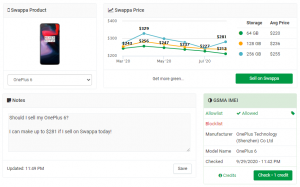
PROTIP: Swappa makes it easy to check the status of your phone with our free ESN / IMEI / MEID Checker. Not only does our IMEI checker verify device authenticity and check to make sure your phone isn’t on a blocklist, but it also tracks your phone’s value over time helping you get all that your phone’s worth when you decide to sell.
- Use the Swappa ESN/IMEI Checker to find out how much your phone is worth and to confirm that your phone hasn’t been blocklisted
- If you’re unsure whether your device is still being financed, call your carrier to find out
If you’re trying to get the most money for your used phone, you’ll want to sell on Swappa. As part of Swappa’s no junk policy, your phone also has to meet our strict eligibility criteria:
- Fully functional and ready for activation
- No cracks, chipped glass, or water damage
- Functional battery that is able to hold a charge
- Device must be fully owned by the seller (no outstanding financial obligations)
✅ Back up your phone
After you’ve verified that your device is eligible for sale, the next step is to back up all the data on your existing phone. Although iPhones and Android phones perform automatic cloud backups, it’s always a good idea to verify that all your data’s safe. Luckily, performing a manual backup on a modern smartphone is incredibly easy.
Here’s how to manually back up your iPhone to your computer:

- Connect your iPhone to your computer and open iTunes if you’re using a PC, or Finder if you’re on macOS 10.15 or later.
- Locate your iPhone on your computer and enter your device passcode.
- Navigate to the Backups section in Finder or iTunes and click Back Up Now. We recommend encrypting local backups for increased security.
- Once your backup is complete, a message will appear stating when you last backed up your iPhone.
Manually backing up an Android phone such as a Galaxy S or Galaxy Note is just as easy:
- Open your Settings app and tap on Accounts and Backup.
- Tap the switch to activate automatic cloud backups
- Perform a manually back up by tapping Google Account and then tapping Back Up Now.
✅ Remove your cloud accounts and perform a factory reset
After backing up your phone and double-checking to make sure that your data is safely stored on your computer or in the cloud, you need to remove your cloud accounts and perform a full factory reset. Doing so will remove all of your personal data, pictures, videos, and contacts; so only perform a factory reset after you’re 100% sure that your data is safely backed up.
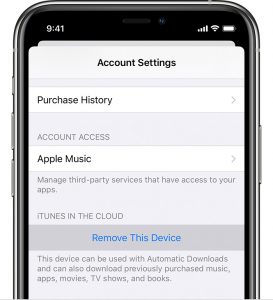
Remove your iPhone from your Apple ID
Before selling a used iPhone, you must dissociate it from your Apple ID and disable security features such as Find My iPhone. Don’t worry; it’s incredibly easy, and you can do this straight from your phone:
- Open the Settings app and click on [your name]
- Tap iTunes & App Store
- Tap your Apple ID and then tap View Apple ID.
- Scroll down to the iTunes in the Cloud section and tap Remove This Device
iPhone full factory reset
After removing your Apple ID, you need to perform a full factory reset.
- Open the Settings app and navigate to General > Reset
- Tap Erase All Content and Settings
- Enter device credentials if prompted and wait a few minutes for your data to be completely reset
Android full factory reset
Resetting an Android device like a Galaxy S or Galaxy Note is just as easy. After verifying that you’ve successfully backed up your personal data, perform the following steps:
- Open the Settings app and search for Factory Data Reset
- Tap Factory Data Reset and then tap on Delete all
- After a few minutes, your phone’s data will be wiped and restored to factory defaults
✅ Thoroughly clean the exterior of your phone
The next step is to sanitize your phone. Regularly cleaning your phone is a great way to maintain hygiene. And given the current state of the world, this is more important than ever. We recommend following the FCC guidelines on how to sanitize your device:
- Fully power down your phone
- Take a lint-free cloth and moisten it with soapy water
- Gently wipe down your device using the cleaning cloth
When sanitizing your device, it is extremely important to avoid aerosol sprays and cleaning solutions with harsh chemicals or abrasives. These cleaning solutions often damage plastics and can eat away at your screen’s oleophobic coating. You also want to avoid water damage by keeping liquids and moisture away from physical buttons and device openings
✅ Find the right place to sell
Now that your phone has been prepped, it’s time to figure out where to sell your old phone for the most money. You have plenty of options, so it’s fairly easy to get overwhelmed. Choose wisely because where you sell determines how much money you’ll make. But don’t worry; we’ve made things easier by comparing the resale values for every single iPhone released since 2014 at some of the most popular buyback and trade-in sites.
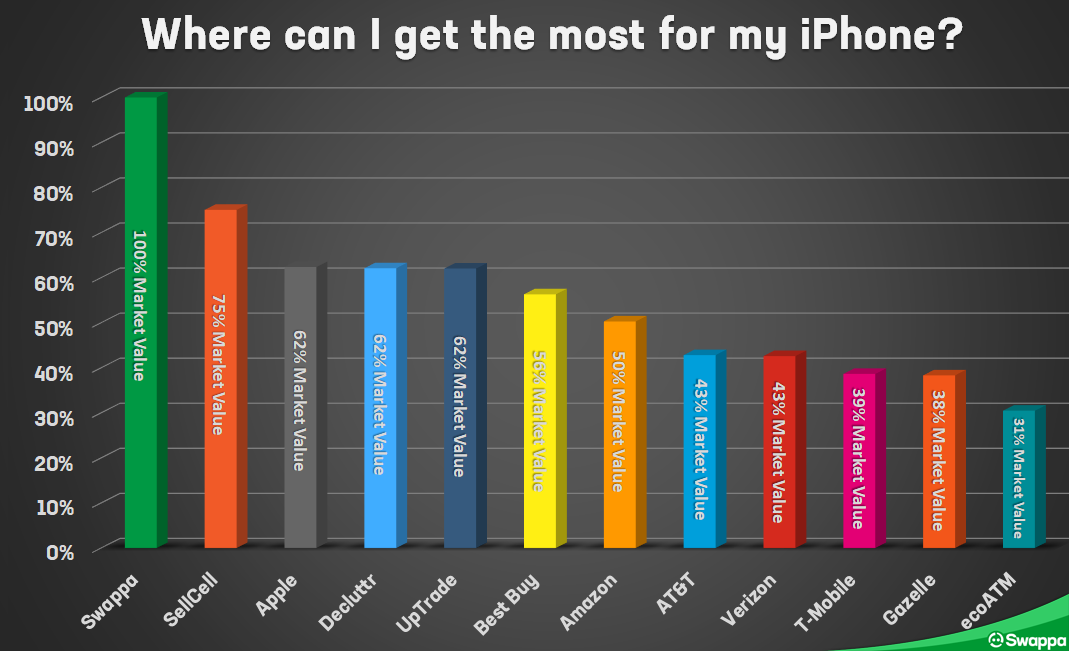
For more details on how we obtained this data and to see how much you can expect to fetch for your specific iPhone at each location, head over to our roundup of the Best Places to Sell Your iPhone in 2021.
How to sell your phone on Swappa
We think the choice is pretty clear: Swappa is the best way to sell your used tech. Not only does Swappa get you more money for your used phone, but our expert moderation team keeps you safe from scammers. Win-win.
Assuming you have a device that meets our strict eligibility criteria, how do you get started selling? It’s as easy as 1-2-3.
- Search for your device on the Sell on Swappa page
- Create your listing by entering device details such as carrier, storage, condition, and price
- Click “Publish” and upload the required verification photos
After you’ve gone through these steps, our moderation team will review your listing. Once it’s approved, you have the option to set an expiration date, share your listing on social media, and even accept offers lower than your asking price. Visit our guide on How to sell on Swappa for an in-depth walkthrough of the entire selling process, complete with screenshots and tips on how to make your listing stand out.
With Apple’s upcoming iPhone launch looming on the horizon, there’s no better time than now to sell your used iPhone or Android phone. And if you didn’t already know, Swappa is the best place to sell your used tech for the most money.
Swappa is a safe and easy-to-use marketplace for newish smartphones, MacBooks, video games, cameras, and more. Whether you’re buying or selling, you’ll always get the best deals on Swappa. We cut out the middleman, which means that sellers make more and buyers pay less. And thanks to our extensive marketplace protections, Swappa keeps you safe while doing so.
Click the button below to get the most for your used iPhone or Android.